
REMO 3000 Remote
Control every Mac you own from your phone: live screen, touchpad, keyboard, and switching between computers.
$29.00
App kit · The files to make your own copy · made by DanVelasko
4/10 Early, works on the happy path
How developed it is, scored by the maker's AI against a fixed rubric. Details under Tech specs.
Pay once, keep it forever. Card payment through Stripe.
What it does
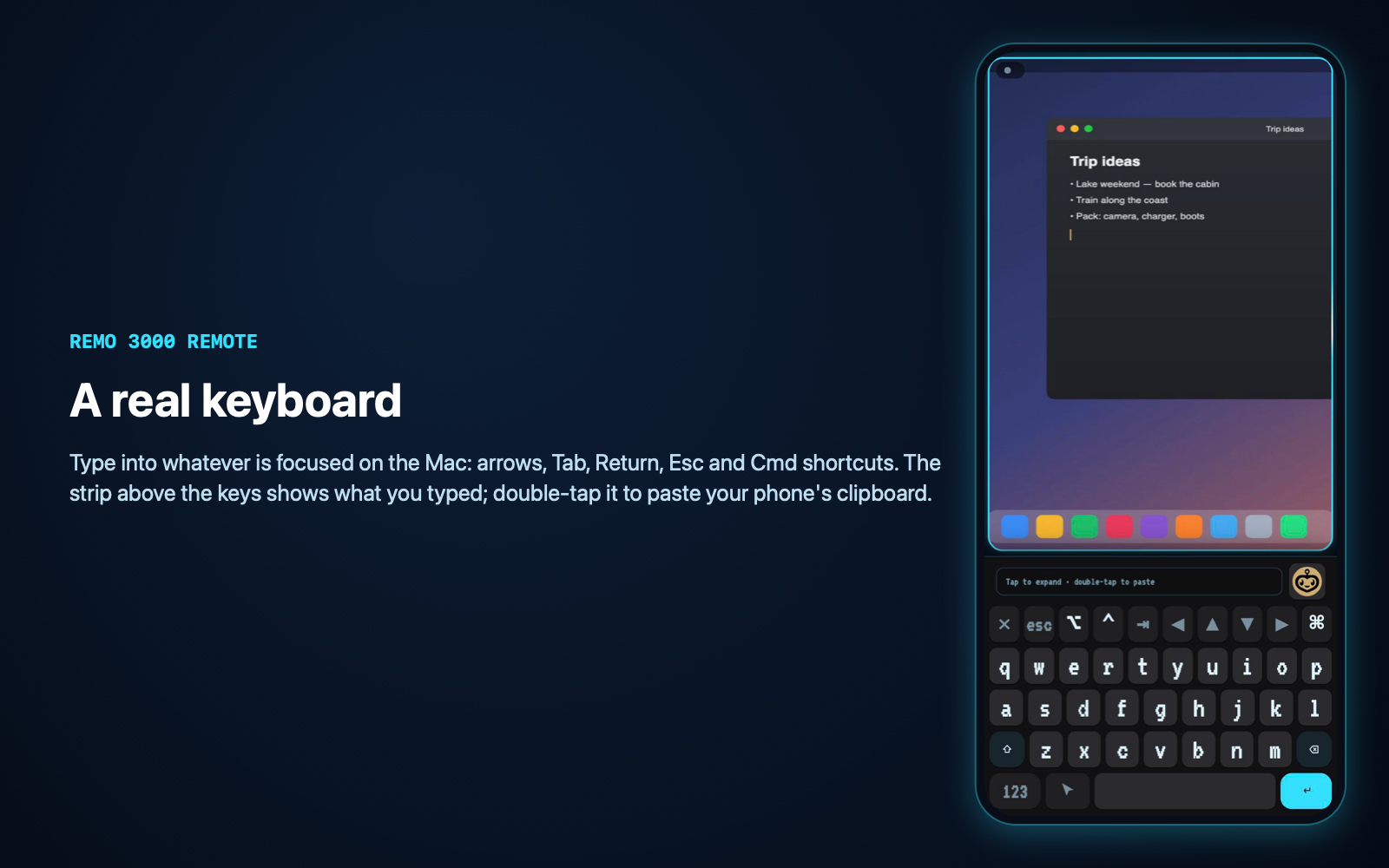
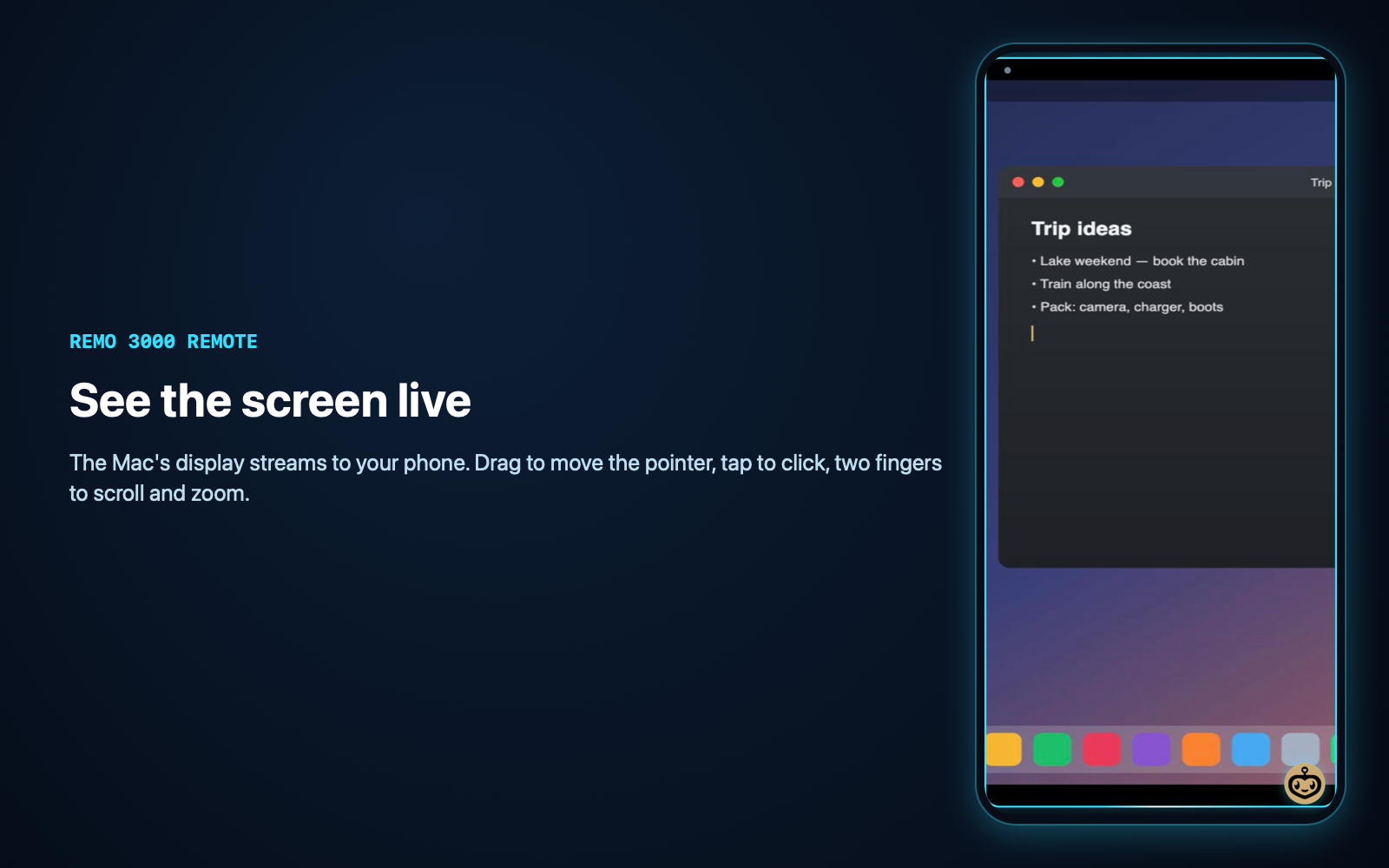
REMO 3000 Remote turns your phone into a remote for your Macs. Open it and you see the Mac's screen live. Tap on the picture to click, use the touchpad mode to move the cursor, and type on a full keyboard with Esc, Tab, arrows and ⌘ shortcuts.
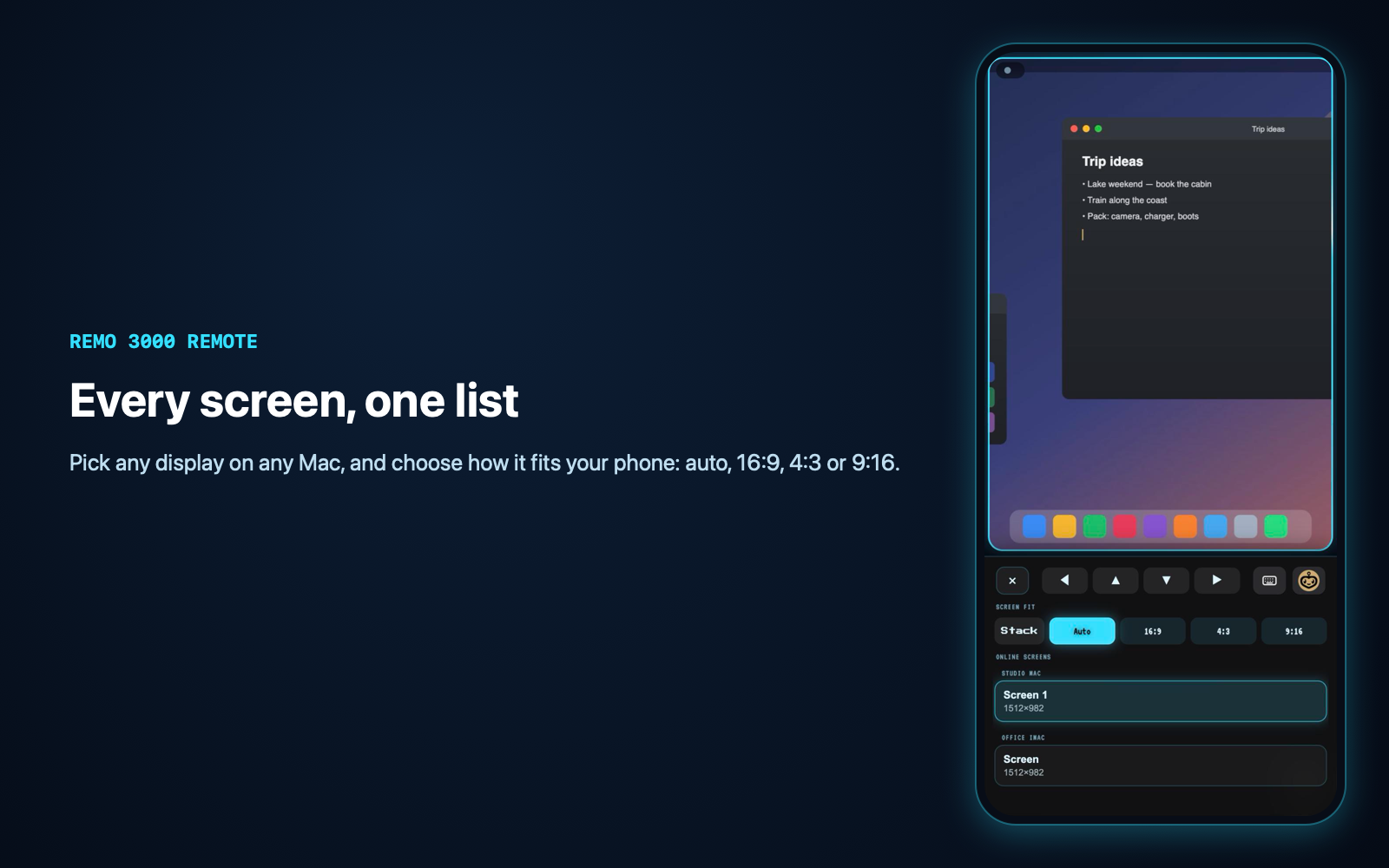
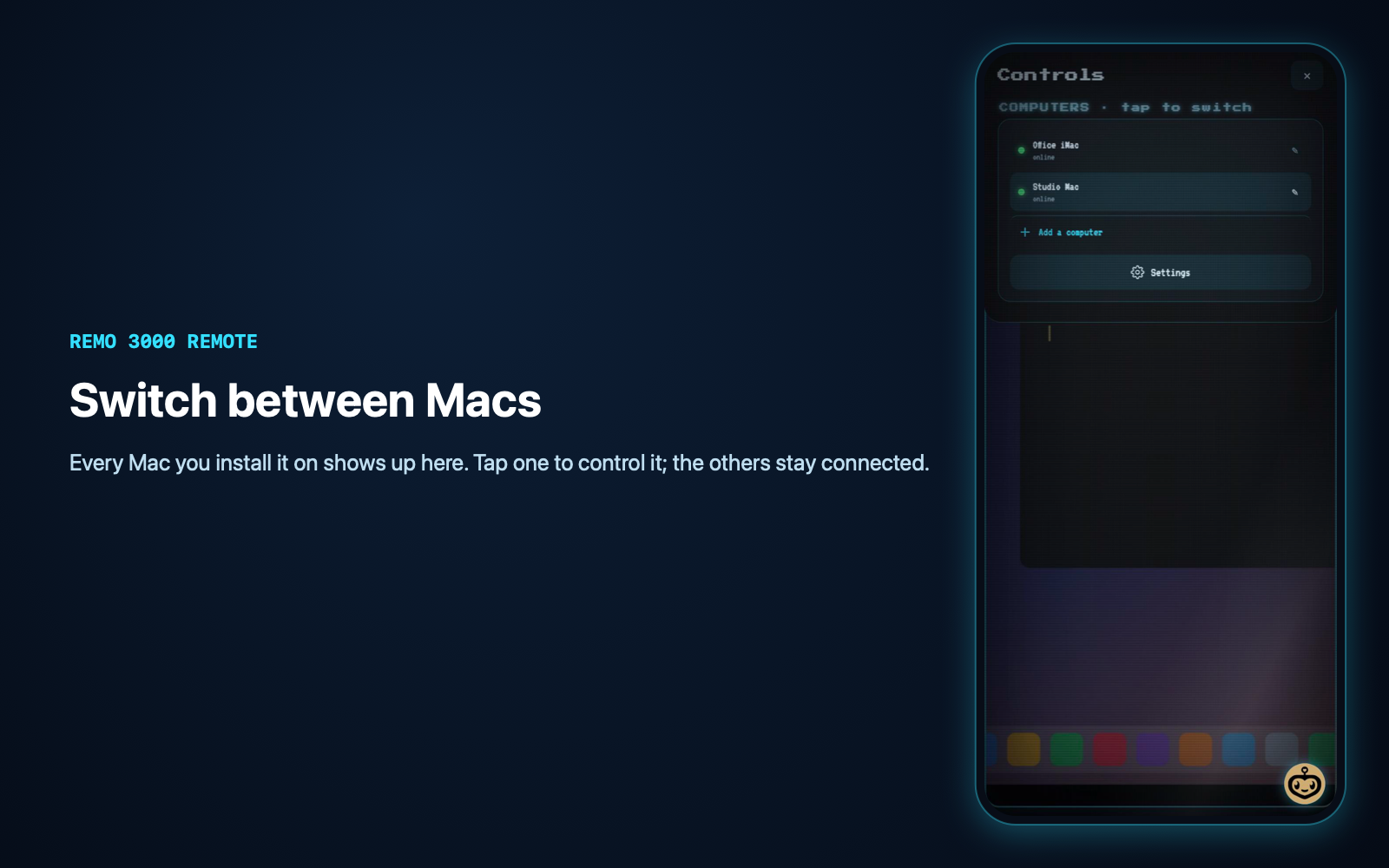
It is built for people with more than one Mac, or one Mac in another room. Every Mac you set up appears in a Computers list, and you switch with one tap. Every display of every Mac is listed too.
What is included:
- the phone app (a web page you add to your home screen)
- the small Mac helper that streams the screen and performs your taps and keys
- a one-file database setup
- a step-by-step setup guide and a full handoff document
- screenshots and the logo
What you set up yourself:
- a free Supabase project, for sign-in and the private live channel between your phone and your Macs
- somewhere to host the web page over HTTPS
- running one installer in Terminal on each Mac, and switching on two macOS permissions, Screen Recording and Accessibility
Plan on 30–45 minutes.
What is not included:
- Windows or Linux computers
- a native App Store app
- hosting
- end-to-end encryption: traffic is TLS-encrypted but relayed through your Supabase project
- video-smooth streaming: expect roughly 3–7 frames per second
This is the remote-desktop part of the author's larger REMO 3000 project, without any of its AI, chat or hardware features.
What you get
A paid license to use it in your own projects. You cannot resell the kit itself.
Straight talk
What the maker's AI found when it looked at the app, after running it. Vibe Codes checks this against the package.
REMO 3000 Remote is a working, self-hosted phone remote for Macs, taken out of a larger project the author uses every day. The connection, the live screen and the multi-Mac and multi-display plumbing were run successfully from this package, and the phone screens are complete. Clicking and typing use the original's unchanged code but were not re-tested after the cut, and the keyboard no longer opens by itself when you click into a text field. Setup needs a free Supabase project, a web host and Terminal on each Mac, so it suits people comfortable following a 30–45 minute guide. It is ready to se
Reviews
No reviews yet. Used it? Be the first.
Peer reviewed: only people who bought, downloaded or opened it through Vibe Codes can leave stars. Anyone signed in can comment below.
Tech specs
· for developers, and for when you are ready
- Built with
- Swift, Node.js, Supabase, Single file
- License
- LicenseRef-Commercial
- Includes
- The screens · The engine · Instructions · Pictures & logo
- Live at
- https://claude.ai/artifact/XTRBfiFseMoyG7bXY5TefD ↗
- Listed
- Last reachable
Development score: 4/10 — Early, works on the happy path
The remote-desktop code has 3½ months and 600+ commits of daily use by the author, with many reliability fixes to capture, input and multi-Mac handling. This package is a fresh extraction with no automated tests, a setup that takes several manual steps, and a few paths (input on a real Mac, the always-on install step, Android) not re-run after the cut.
- Original repository: 623 commits on 63 days between 2026-07-03 and 2026-10-12
- Commit history shows recurring fixes to capture hangs, multi-display coordinates, and commands reaching the wrong Mac
- No unit or integration test suite; only a syntax check and an install-time self-test
- Self-test and a real helper run passed against a Supabase project: sign-in, private channel, heartbeat, two displays, one real frame
- Phone UI tested in a 430×932 browser with demo data, with no console errors
- Docs: README, SETUP.md and a full HANDOFF.md written for this package; the original had little user-facing documentation
Setup guide
- Create a free Supabase project. In SQL Editor, run
backend/supabase/setup.sql. - In Supabase, go to Authentication → Users → Add user and create your account with Auto Confirm ticked. Then turn off Allow new users to sign up.
- Copy
ui/config.example.jstoui/config.jsand fill in your Project URL and publishable key. - Deploy the
ui/folder to a Node host, with start commandnode server.js. For a local test, runcd ui && node server.js. - Open the page on your phone, sign in, and add it to your home screen.
- On each Mac, install Node 20+ and run
xcode-select --install. Optionally runbrew install cliclick. Then runcd backend/agent && ./install.shand answer its questions. - When macOS asks, switch on REMO 3000 Remote in Screen Recording and in Accessibility.
- On the phone, open Controls → Computers and tap your Mac.
Full details are in docs/SETUP.md.
Full handoff document
· long on purpose; read the section you need
REMO 3000 Remote: Handoff
This is a complete and honest description of what you are getting. Each section stands on its own, so skip to the one you need.
---
1. Overview
What it is. A phone remote for Macs. You open a web page on your phone and see a live picture of a Mac's screen. You tap on the picture to click and use an on-screen keyboard to type. You can switch between every Mac you have set up, and between each Mac's displays.
Who it is for. People who own one or more Macs and want to reach them from the couch, another room, or away from home, without a subscription remote-desktop service. Setup takes some care (see §9). A non-developer can do it by following [SETUP.md](SETUP.md), but they will use Terminal once per Mac.
How it came to be.
- It is the remote-desktop part of a larger personal project, REMO 3000. That project is a Mac assistant with an AI agent, chat, local language models, voice, phone and hardware integrations.
- The larger project was built over about 3½ months, from 2026-07-03 to 2026-10-12. Its repository has 623 commits on 63 separate days.
- It was written almost entirely with Claude Code (Anthropic's AI coding assistant), directed by the author.
- The author's part was deciding what to build, testing on their own Macs and iPhone every day, reporting what felt wrong, and producing the artwork. The artwork was AI-assisted; see §20.
- This package was cut out of that project on 2026-10-12/13. Everything that wasn't remote desktop was removed:
- the AI agent and chat
- the "second brain" (local models and memory)
- voice dictation
- Face ID lock
- clipboard/image transfer
- phone/Bluetooth/ESP32 hardware
- Omi wearable integration
- task broadcast
- picture-in-picture
- deep links
The remaining code was adapted to read its settings from your own Supabase project.
How big it is.
| Part | Size | |---|---| | Phone app | about 3,900 lines (one HTML file) | | Mac helper | about 1,310 lines of JavaScript, plus two small Swift programs (150 and 90 lines) | | Database setup | 31 lines of SQL |
---
2. Feature inventory
Legend:
- WORKS: seen working in this package.
- WORKS (core): the code is unchanged from the original REMO, where the author uses it daily, but it was not re-run inside this package.
- PARTIAL and UNTESTED mean what they say.
| Screen / feature | Status | Detail | |---|---|---| | Sign-in page | WORKS | Email + password against your Supabase project. Shows "Not configured yet" when config.js is missing. Tested in a browser at phone size. | | Sign-up (create account) | WORKS (core) | Calls Supabase signUp. With email confirmation on (Supabase's default) the user must click the email link. §9 recommends creating the account in the dashboard instead and disabling sign-ups. | | Live screen mirror | WORKS | The Mac helper signed in, joined the private channel, found both displays of the test Mac and sent a real 44 KB JPEG frame. The phone's rendering of frames was checked with a built-in demo frame. | | Frame pacing | WORKS (core) | The phone asks for the next frame when the last one arrives. That pacing is about 7 fps while you move the cursor, slower when idle, and paused when the page is hidden. Frames are JPEG, at most 820 px on the long side at quality 34, and fall back to 640 px when large. | | Tap to click, double-click, right-click (two-finger tap or 3 s hold), drag | WORKS (core) | Sent as click, doubleClick, rightClick, drag and dragHere, and performed with the compiled remo-input helper or cliclick. Not re-verified in this package, by design: the author does not let automated tests click on their real Mac. | | Trackpad mode (relative cursor, tap or click button, draw/hold button) | WORKS (core) | moveBy, clickHere, rightHere, cursorPos. Same caveat. | | Scroll (three fingers) and page zoom (two-finger hold in trackpad mode) | WORKS (core) | scroll and zoom commands. Same caveat. | | Pinch to zoom the picture on the phone | WORKS | Local view zoom, seen working with the demo frame. | | On-screen keyboard (letters, 123, shift, Esc, ⌥, ⌃, ⌘, Tab, arrows, backspace, return) | WORKS (UI) / WORKS (core) (Mac side) | The layout renders and was tested. Keys become type, key and combo commands. Key names go through a whitelist on the Mac. | | Typed-text strip above the keyboard; double-tap to paste the phone's clipboard into the Mac | WORKS (core) | Reads the phone's clipboard only when you double-tap the strip, then types it on the Mac. | | Auto-keyboard when a text field is focused on the Mac | PARTIAL | The phone side is intact, but the Mac helper's "what is focused" detection (axCaret) was cut with the agent code and is now a stub that returns nothing. In practice the keyboard does not pop up by itself; open it with the keyboard key. The toggle in Settings stays. | | Multiple Macs: Controls → Computers list, tap to switch, rename | WORKS (core) / WORKS (UI) | The list is built from each Mac's heartbeat (every 5 s). Commands are addressed to one Mac by id, and a Mac ignores commands meant for another. Tested in the UI with a two-Mac demo and with one real helper. The author runs several Macs daily on the original. | | Multiple displays per Mac: screens pane, stacked view | WORKS (UI) | Each display from the heartbeat is listed, with fit options Auto, 16:9, 4:3 and 9:16. | | ⌘← / ⌘→ half-screen snapping | UNTESTED | The phone uses these keys to jump its view to the left or right half of the display. The helper also has code to snap the front window to a half. Neither was exercised in this package. | | "Add a computer" onboarding | WORKS (UI) | Shows the install command from config.js (SETUP_COMMAND) and waits for the new Mac's first heartbeat. | | Settings: screen fit, stacked screens, touchpad speed, tap to click, click button, auto keyboard, pause screen, refresh, sign out | WORKS (UI) | Each control toggles and is remembered on the phone. | | "Mac needs permission" warnings | WORKS (core) | The helper reports its Screen Recording and Accessibility status in every heartbeat, and the phone warns when either is missing. | | Mac helper installer (install.sh) | PARTIAL | Steps 1–5 ran (checks, packages, settings, helper compile, self-test against a real Supabase project). Steps 6–7 (LaunchAgent and the permission prompts) were not run on a fresh Mac, so as not to disturb the author's live installation. They mirror the original installer, which is in daily use. | | Uninstaller | UNTESTED | Three commands. Read carefully, not run. | | Loading animation / boot video | WORKS | Plays loading-v2.mp4 or loading-v3.mp4 on load. Falls back to a still poster. | | Android phones | UNTESTED | Developed and used on iPhone Safari. Nothing is iOS-only, but it was never tried on Android. |
---
3. Architecture
`` ┌──────────────────────────┐ ┌───────────────────────────────┐ ┌───────────────────────────────┐ │ PHONE (web page) │ HTTPS │ YOUR SUPABASE PROJECT │ WSS │ EACH MAC: "REMO 3000 Remote" │ │ ui/index.html │◀────────▶│ • Auth (email + password) │◀────────▶│ backend/agent/remote-agent.js │ │ served by ui/server.js │ WSS │ • Realtime broadcast channel │ │ ├─ remo-capture (Swift, │ │ (any Node host) │ │ "remote:<user id>" │ │ │ ScreenCaptureKit) │ │ │ │ • RLS: only that user may │ │ ├─ remo-input (Swift, │ │ supabase-js from │ │ read/send on that channel │ │ │ CGEvent mouse/keys) │ │ cdn.jsdelivr.net (pinned)│ │ (nothing stored in tables) │ │ └─ osascript / cliclick │ └──────────────────────────┘ └───────────────────────────────┘ └───────────────────────────────┘ ``
Messages on the channel.
| Direction | Event | Payload | |---|---|---| | phone → Mac | command | { id, action, value, device, timestamp }. action is one of frame, click, doubleClick, rightClick, moveBy, moveTo, cursorPos, clickHere, rightHere, dragHere, scroll, zoom, drag, type, key, combo. The helper refuses anything else. | | Mac → phone | heartbeat | Every 5 s: { device, name, ts, displays[], caps[], perms{a11y, screen} } | | Mac → phone | frame | { b64 JPEG, roi "display,x,y,w,h" } | | Mac → phone | ack, cursorResult, focusField | Small replies |
Where state lives.
- Phone: the Supabase session token and your settings, in the browser's localStorage. Nothing else.
- Supabase: your user account. Channel messages are relayed live and not written to any table.
- Each Mac:
backend/agent/.env: project URL, key, email (mode 600)- the macOS Keychain: the password, under service
REMO3000Remote ~/REMO3000Remote/: the compiled helpers, the app wrapper, the latest frame (frame.jpg, overwritten each time)backend/agent/perms.json: the permission flagsbackend/agent/agent.log
What runs where.
- The phone page is static.
server.jsonly serves files with security headers. - The Mac helper runs as a per-user LaunchAgent (
com.remo3000remote.agent), starts at login and restarts if it exits. It runs inside a small app wrapper named "REMO 3000 Remote.app": a copy of your Node binary, signed ad hoc on your Mac. That name is what macOS shows in the permission lists.
---
4. Data model
There are no tables. The only database objects this product touches are:
auth.users(Supabase built-in): the email and password hash of each account. This is the only personal data stored.realtime.messages(Supabase built-in): row-level security is switched on, with two policies, "remote owner can read" and "remote owner can send". They allowselectandinsertonly forextension = 'broadcast'on the topicremote:<auth.uid()>. Broadcast messages pass through. Supabase does not keep them.
There are no relationships. A "computer" is not a database row: it exists while it sends heartbeats.
Where personal data passes through:
- Screen images and typed text travel phone ↔ Supabase ↔ Mac over TLS.
- They are not end-to-end encrypted: Supabase's Realtime servers handle them in memory while relaying.
---
5. Auth and permissions
- Sign-in: Supabase email + password on both the phone and each Mac.
- The Mac signs in as the same account as the phone.
- The Mac's password is kept in the macOS Keychain after the first sign-in; the installer then blanks it in
.env. - Roles: there is one, "the account owner". There is no admin, no sharing and no multi-user.
- Enforcement:
- Each channel is
private: true. Supabase checks the policies in §4 against the user's access token when joining and sending, so one account can't read or send on another account's channel. - On the Mac, a command must also name that Mac's id, or be unnamed while it is the only Mac online.
- Only the 16 listed actions are accepted.
- macOS permissions: the Mac's owner grants Screen Recording and Accessibility to "REMO 3000 Remote" in System Settings. Without Screen Recording the screen is black; without Accessibility clicks and keys do nothing.
- Important: anyone who knows your account password can control your Macs. Use a strong, unique password.
---
6. Payments and money
None. The product has no payments, subscriptions or in-app purchases.
---
7. External services
| Service | Used for | Cost | Credentials | Without it | |---|---|---|---|---| | Supabase (supabase.com) | Sign-in, plus the live Realtime channel between phone and Macs | Free tier is enough for personal use. See §14 for when streaming a lot might need the paid plan (from about $25/month). | Dashboard → Project Settings → API Keys: Project URL and publishable key | Nothing works | | jsDelivr CDN (cdn.jsdelivr.net) | Serves @supabase/supabase-js@2.108.2 to the phone page | Free | None | The phone page can't load. You can self-host the file instead (§17). | | A Node web host (Render, Railway, Fly.io…) or your own machine | Serves the ui/ folder over HTTPS | Many have free tiers | Their own sign-up | You can't open the app away from home | | npm registry | npm ci on each Mac installs supabase-js, dotenv and ws, pinned with a lockfile | Free | None | The installer stops at step 2 | | Homebrew → cliclick (optional) | Faster, more reliable typing and clicking | Free | None | The helper falls back to System Events |
---
8. Environment variables
Mac helper: backend/agent/.env, created by install.sh from .env.example.
| Variable | Required | What it is | Where to get it | Example shape | |---|---|---|---|---| | SUPABASE_URL | yes | Your project's URL | Supabase → Project Settings | https://abcdefghijklmnop.supabase.co | | SUPABASE_PUBLISHABLE_KEY | yes | Public client key | Supabase → Project Settings → API Keys | sb_publishable_… (or legacy eyJ… anon key) | | REMOTE_EMAIL | yes | Account this Mac signs in as (same as the phone) | You created it (§9 B) | you@example.com | | REMOTE_PASSWORD | first run only | That account's password. Moved into the Keychain and blanked by the installer. | You | (empty after install) | | REMOTE_DEVICE_NAME | no | Name shown on the phone | — | Studio Mac (default: the Mac's name) | | REMOTE_DEVICE_ID | no | Override of the machine id | — | leave empty (default: hardware UUID) | | REMO_HOME | no | Where helpers and the frame file live | — | default ~/REMO3000Remote | | REMO_KEEP_AWAKE | no | Set to 1 by the LaunchAgent | — | 1 | | REMO_SELFTEST | no | Used by install.sh for a one-shot test | — | 1 |
Phone app: ui/config.js, copied from config.example.js. It is not secret; the browser downloads it.
| Key | What it is | |---|---| | SUPABASE_URL | Same as above | | SUPABASE_PUBLISHABLE_KEY | Same as above | | SETUP_COMMAND | The text shown in "Add a computer" |
Web server: PORT. The default is 3000; most hosts set it for you.
---
9. Setup from zero
The full click-by-click version is [SETUP.md](SETUP.md). In short:
- Supabase.
- Create a project.
- Run
backend/supabase/setup.sqlin SQL Editor. Two policy rows come back. - Copy the Project URL and the publishable key.
- Account.
- Authentication → Users → Add user, with Auto Confirm.
- Then Authentication → Sign In / Providers → turn off "Allow new users to sign up".
- Phone app.
cp ui/config.example.js ui/config.jsand fill it in.- Deploy
ui/to a Node host with start commandnode server.js, or for a local test runcd ui && node server.jsand browse tohttp://<mac-ip>:3000. - Open it on the phone, sign in, and Add to Home Screen.
- Each Mac.
- Install Node 20+ and run
xcode-select --install. Optionally runbrew install cliclick. - Copy the package over, then run
cd backend/agent && ./install.shand answer its questions. - Switch on REMO 3000 Remote in Screen Recording and in Accessibility.
- Use it. Controls → Computers → tap the Mac.
---
10. Deploying
- Where the original runs. The author's full REMO runs on their own domain, with the Mac helpers on their own Macs. This package has never been deployed as its own site. It was run locally (
node server.json 127.0.0.1) for testing and screenshots. - What a buyer must do. Create their own Supabase project, then write
ui/config.jsand deployui/. - Use a Node host so
server.jscan send its security headers: - no framing (anti-clickjacking)
- a strict Content-Security-Policy that allows only your Supabase project and jsDelivr
- no camera or mic access
- noindex
- If you use a plain static host instead (Netlify, Vercel static, GitHub Pages, S3), copy those headers into its config. They are listed at the top of
ui/server.js. - The CSP allows any
*.supabase.coproject, so a standard Supabase URL works without editing. If you put Supabase behind a custom domain, add that domain toconnect-srcinserver.js. - The Mac side is not deployed anywhere. Each Mac runs its own helper.
---
11. Testing
- Automated tests: none. There is no unit or integration test suite in the original project or in this package.
- Checks that exist:
backend/agent:npm run check(syntax check) andnpm run selftest. The self-test signs in, joins the channel, sends one heartbeat and printsREMO_SELFTEST_OK;install.shruns it.- Every inline script in
ui/index.htmlwas parsed with a syntax checker during packaging. - What was actually run for this package:
- The helper's self-test, plus a real run of the helper against a Supabase project: sign-in, private channel, heartbeats, two displays detected, one real frame captured and sent.
- The phone page in a browser at 430×932 with a built-in demo mode (
window.__remo.demo(), which fakes two Macs locally and sends nothing). This covered sign-in, mirror, keyboard, screens pane, Controls and Settings, with no console errors. - What was not run:
- Clicks and keys on a real Mac from this package.
install.shsteps 6–7 on a fresh Mac.uninstall.sh.- Android.
- Two real Macs at once from this package (the original does this daily).
---
12. Known bugs and limitations
- The auto-keyboard doesn't trigger. The focused-text-field detection was removed with the agent code:
axCaret()is a stub inbackend/agent/remote-agent.js. Open the keyboard by hand. - Macs only. There is no Windows or Linux helper.
- Not end-to-end encrypted. Frames and keystrokes are encrypted in transit (TLS) but pass through Supabase's servers in readable form (§4).
- Latency and frame rate. Each frame is a JPEG over a WebSocket relay, so expect roughly 3–7 frames per second and a few hundred milliseconds of delay. That's fine for clicking around, typing and checking on things, but not for video or games.
- Password briefly visible to local process listings. When the helper first stores the password in the Keychain, it passes it to the
securitycommand as an argument for a split second (keySet()inremote-agent.js). - Moving the package folder breaks the always-on service. The LaunchAgent points at the folder it was installed from; run
./install.shagain after moving it. - Replacing the app wrapper resets permissions. Re-running the installer after a Node upgrade copies a new binary, and macOS may ask for Screen Recording and Accessibility again.
- Supabase rate limits. The free tier allows a fixed number of Realtime messages and concurrent connections per month (see §14).
- Email confirmation. If you leave sign-ups on with Supabase's default email confirmation, its built-in email sender is heavily rate-limited. That's why §9 says to create the account in the dashboard.
- The phone page is a long single file (3,900 lines). It is readable but not modular (§16).
- ⌘← / ⌘→ half-screen snapping is untested in this package.
---
13. Security review
What was checked. Every file in the package was read. In particular:
- the Mac helper's command handler
- every place it starts another program
- the two Swift helpers
- the installer and uninstaller
- the server's headers
- the SQL policies
| Area | Finding | Status | |---|---|---| | Who can control a Mac | Only someone signed in as the account owner. The Realtime channel is private, and RLS limits each user to remote:<their id>. | OK | | Command surface | The helper accepts 16 named actions and ignores everything else. There is no "run this shell command" action. | OK | | Starting programs / injection | The helper starts only fixed system tools with argument arrays (no shell): osascript, screencapture, sips, caffeinate, security, ioreg, scutil, which, cliclick, and its two compiled helpers. Typed text and key names that reach AppleScript are escaped, or must match a whitelist of key names. | OK | | Downloads at run time | None on the Mac. The installer only runs npm ci against the lockfile (all packages from registry.npmjs.org) and compiles the included Swift files locally. Nothing is fetched and executed. | OK | | Secrets in the package | No keys, tokens or passwords. config.js and .env are not included; examples with placeholders are. | Removed (see secrets audit in vibecodes.json) | | Password storage on the Mac | macOS Keychain; .env is mode 600, and the password is blanked after the first sign-in. | OK, with limitation 12.5 | | Clickjacking | X-Frame-Options: DENY and frame-ancestors 'none'. | OK | | Content-Security-Policy | Scripts are allowed only from the page itself and jsDelivr; connections only to *.supabase.co. | OK | | Third-party script | supabase-js comes from jsDelivr at a pinned exact version. There is no Subresource Integrity, because ESM bundles from that CDN import further files. | Residual: self-host to remove (§17) | | Sign-ups | Open by default in Supabase. A stranger who signs up gets an empty channel of their own and can't see your Macs. | Recommend disabling (§9) | | Rate limiting | The app adds none. Supabase Auth applies its own sign-in rate limits. | Residual | | Screen frames on disk | The latest frame is written to ~/REMO3000Remote/frame.jpg, not the shared /tmp, and is overwritten every time. | Fixed during packaging | | Tracking / analytics | None. The page talks only to your Supabase project and jsDelivr. | OK | | Data in transit | TLS everywhere, not end-to-end (12.3). | Residual |
Fixed while packaging:
- The original phone app contained a hard-coded webhook token for an unrelated feature (Omi). The feature was removed from this package, and the token was rotated in the original project.
- A Supabase CLI file naming the author's project was untracked from the original repo; it was never part of this package.
- Frames moved out of
/tmp. - The password is now removed from
.envafter the Keychain copy.
---
14. Performance and scale
- Per user:
- A frame is usually 20–80 KB. Streaming continuously at about 5 fps is roughly 0.5–1.5 GB of traffic per hour.
- The phone stops asking for frames when the page is hidden, and Settings → "Pause screen" stops them on demand.
- Supabase free tier: its published limits include a monthly cap on Realtime messages (2 million at the time of writing), concurrent connections (200) and egress.
- One person streaming an hour a day stays well within the message cap.
- Long or heavy daily streaming may reach the egress limit and need the Pro plan.
- Check supabase.com/pricing, since limits change.
- What gets slow first: the frame rate drops on slow uplinks from the Mac. The helper skips a frame request that arrives while it is still capturing, so it self-paces rather than queuing.
- 10× users: each account is independent, so cost grows linearly with streaming time. There is no server of your own to scale, only the Supabase plan.
- Many Macs per account: the phone lists every Mac that sends a heartbeat. Each Mac adds one connection and one small message every 5 s.
---
15. Code map
`` remo-3000-remote/ ├── vibecodes.json listing manifest ├── README.md short pointer to docs/ ├── .env.example every setting in one place, with explanations ├── LICENSE commercial licence for buyers ├── ui/ │ ├── index.html the whole phone app: markup, styles and one module script │ ├── config.example.js copy to config.js: your Supabase URL + publishable key │ ├── server.js zero-dependency static server with security headers │ ├── package.json "npm start" = node server.js │ ├── FONTS.md licence notes for the two embedded fonts │ └── vendor/ │ ├── icons/ app icon, favicons, sign-in poster, web manifest │ ├── loading-v2.mp4 boot animation (mascot) │ ├── loading-v3.mp4 boot animation (alternate) │ └── demo/demo-desktop.svg made-up desktop used by demo mode for screenshots ├── backend/ │ ├── supabase/setup.sql the two Realtime access policies │ └── agent/ │ ├── remote-agent.js the Mac helper: sign-in, heartbeat, command handler, capture, input │ ├── helpers/remo-capture.swift ScreenCaptureKit capture, kept running, JPEG out │ ├── helpers/remo-input.swift posts mouse/scroll/key events (CGEvent) │ ├── bundle/Info.plist makes macOS show "REMO 3000 Remote" in permission lists │ ├── install.sh 7-step installer │ ├── uninstall.sh removes the LaunchAgent, helpers and Keychain item │ ├── .env.example helper settings │ ├── package.json three pinned dependencies │ └── package-lock.json exact versions ├── docs/ README.md · SETUP.md · HANDOFF.md └── assets/ cover.png · screen.png · keyboard.png · computers.png · screens.png · settings.png · signin.png · logo-512.png · logo-192.png · app-icon-180.png · TOKENS.md ``
Inside remote-agent.js, top to bottom:
| Section | What it does | |---|---| | Config | Reads .env | | keySet / keyGet | Keychain | | main() | Single-instance guard, sign-in, channel join with automatic rejoin and backoff | | heartbeat() | The 5-second "I'm online" message | | handle() | The command whitelist | | Permissions | Probe and perms.json | | run / runP / osa | Safe process helpers | | Display discovery | Finds the displays and their layout | | Input | remo-input, cliclick, System Events | | Capture | remo-capture, with screencapture + sips as the fallback | | Frame encode | Builds the frame message | | Keyboard mapping | Key names and whitelist | | Window snap | Halves of the screen |
---
16. Decisions and trade-offs
- Supabase Realtime instead of WebRTC or a VPN.
- Gains: no port forwarding, no TURN server and nothing to host, and it works through any network.
- Costs: frame rate, latency, and the lack of end-to-end encryption. WebRTC would be the next step for smoother video.
- JPEG frames requested one at a time. This is simple and self-pacing, and it never builds a backlog on a slow link. Only the visible part is captured, so zooming in on the phone gives a sharper image instead of a bigger one.
- One HTML file for the phone. It grew that way in the original and was trimmed, not rewritten. Easy to host; harder to maintain. A buyer planning big changes might split it into modules.
- Swift helpers compiled on the buyer's Mac. Shipping source instead of binaries means nothing opaque is installed. The cost is needing the Xcode Command Line Tools.
- The app wrapper around Node. It exists so the macOS permission lists say "REMO 3000 Remote" rather than "node", which would give every Node script that permission.
- Same account on phone and Macs. This keeps things simple, with one password. A future version could give each Mac its own limited credential.
- What I would do differently: add a minimal test harness for the command handler, self-host supabase-js, and use WebRTC for frames.
---
17. How to make it yours
- Name and icon:
<title>and the sign-in text inui/index.htmlui/vendor/icons/*andmanifest.webmanifestbackend/agent/bundle/Info.plist(CFBundleName, and the identifier if you change it everywhere: alsoinstall.sh,uninstall.shand the Keychain service inremote-agent.js)
- Colours: the
:rootvariables at the top ofui/index.html(--accent,--bg,--text, …). Seeassets/TOKENS.md. - Fonts: the two
@font-facerules at the top ofui/index.html, embedded as base64 woff2. - The boot animation: swap or delete
ui/vendor/loading-*.mp4; the list is near the top of the boot script. - Self-host supabase-js:
- Download
@supabase/supabase-js@2.108.2's ESM build intoui/vendor/. - Change the
importline near the start of the module script. - Drop jsDelivr from
script-srcinserver.js.
- Frame size and quality:
helperCap(..., 820, 34, ...)inremote-agent.js(long side in pixels, JPEG quality). - Heartbeat interval:
setInterval(heartbeat, 5000)inremote-agent.js. - Touchpad speed presets: the
tp-speedrow in Settings (searchtp-speed). - Keyboard layout:
buildKeyboard()inui/index.html. Keys must also be in the helper's key whitelist (KEYCODESinremote-agent.js). - Install command shown to users:
SETUP_COMMANDinui/config.js.
---
18. Roadmap
These were planned or discussed but not built in this package:
- WebRTC video for smoother frames.
- End-to-end encryption of frames and keys.
- A Windows helper.
- Per-Mac credentials instead of sharing the account password.
- Restoring the auto-keyboard by re-implementing focused-field detection with the Accessibility API, without the agent code.
- An automated test suite.
The original REMO's AI features are deliberately out of scope here.
---
19. Changelog
Reconstructed from the original repository's git history: 623 commits from 2026-07-03 to 2026-10-12. Only remote-desktop milestones are listed.
- 2026-07-03: First "Mac Remote" web controller: fullscreen screen viewer with tap to click, multi-display switching, live region streaming, and a remote keyboard. Redesigned the same day as REMO, screens first and always streaming.
- July–August: Many rounds on the trackpad, keyboard and mirror. Keyboard rebuilt with real key shapes and thumb-friendly placement (2026-08-30).
- 2026-09-01: Cursor moves made pixel-exact on every display, including negative coordinates (monitors left of or above the main one).
- 2026-09-03: Controls lists Macs first, keeps offline ones with last-seen, and makes them renameable.
- 2026-09-05: Multi-Mac fix: a command that names no Mac no longer runs on all of them. Screens pane fixes (stacked displays going black, double shrink).
- 2026-09-05 to 09-06: Screen capture reliability:
- a persistent ScreenCaptureKit helper per display
- capture time limits so nothing hangs
- clearer permission errors
- the "-1 display" trap fixed
- 2026-09-08 to 09-17: "Which computer this goes to" shown above the keyboard. Keyboard and screens side by side on one swipeable rail.
- 2026-10-12: Remote-desktop-only edition extracted for sale (this package):
- agent, brain, voice, hardware and integrations removed
- Supabase settings moved into
config.jsand.env - new installer, uninstaller and setup SQL
- Omi token rotated in the original
- 2026-10-13: Packaging hardening: frames written outside
/tmp, password cleared from.envafter the Keychain copy, lockfile added, "Agent" wording removed from Settings, status dot no longer covers menu titles.
---
20. Assistant's notes
Written by the AI assistant (Claude) that prepared this package, for a careful buyer:
- This is remote-control software, by design. The marketplace's rules list "remote control" among the things to flag, so I am stating it plainly:
- It gives whoever signs in to your account control of your Mac's mouse, keyboard and screen.
- It only works on Macs whose owner installed it and switched on both macOS permissions.
- It only answers your own account.
- It shows up in System Settings by name and can be removed with
uninstall.sh. - There is no hidden account, no shell access and no way to run arbitrary programs.
- The installer runs commands on your Mac, which is also a flagged category:
npm ci,swiftc,codesign,launchctl. Each is listed at the top ofinstall.shand nothing is downloaded and executed. Read it before you run it; it is 105 lines. - Clipboard. The phone reads its own clipboard only when you double-tap the typed-text strip, and only to type that text on your Mac.
- Artwork provenance.
- The icons carry an AI-image-generator signature in their metadata.
- The two boot videos have no recorded source.
- The seller states they own the rights to sell these. If that matters to you, replace them (§17, items 1 and 4); nothing depends on them.
- Fonts. Press Start 2P and VT323 are embedded. Both are under the SIL Open Font License 1.1, which allows bundling with software that is sold. See
ui/FONTS.md. - Maturity. The remote code has months of daily use behind it. This package is a fresh extraction with no automated tests, and a few paths (§11) weren't re-run after the cut, so the score is 4/10 rather than higher.
Package contents
- The screens
ui/— The phone app: one HTML page (live screen, keyboard, trackpad, screens pane, computers list, settings) and a zero-dependency Node static server with strict security headers.- Instructions
docs/— README, a click-by-click setup guide, and a 20-section handoff covering architecture, security, limits and how to adapt it.- Pictures & logo
assets/- The engine
backend/— The macOS helper (Node script + two Swift helpers compiled on install) that streams the screen and performs clicks and keys, its installer/uninstaller, and the SQL that makes each account's Realtime channel private.
All tags
This page as Markdown · for assistants and agents, start at /llms.txt
Comments
No comments yet.