

Chillustrator
Its like Adobe illustrator, Autocad, and a mobile app had a baby and named it Chill.
$15.00
App kit · The files to make your own copy · made by DanVelasko
How developed it is, graded against a fixed rubric — hover or tap the stars to see how.
Pay once, keep it forever. Card payment through Stripe.
What it does
Chillustrator is a full vector drawing board that runs as a single web page (and as a small macOS app around it) with no framework, no build step, no account and no dependencies beyond one vendored polygon library.
It is made for people who draw parts to be cut, printed or engraved and need the drawing to be dimensionally exact: coordinates are doubles in points like Illustrator's own unit, shapes keep their exact parameters, and the exporters write real geometry — a 1 in circle exports as a circle, never a polygon.
What you get
- Illustrator's Advanced toolbar: Selection, Direct Selection, Pen family, Curvature, Type (point, area, on a path), shapes as Live Shapes, Paintbrush and Blob Brush, Pencil, Smooth, Eraser, Trim, Scissors, Knife, Rotate/Reflect/Scale/Shear, Free Transform, Warp family, Shape Builder, Live Paint, Gradient, Blend, Eyedropper, Measure, Artboards, graphs.
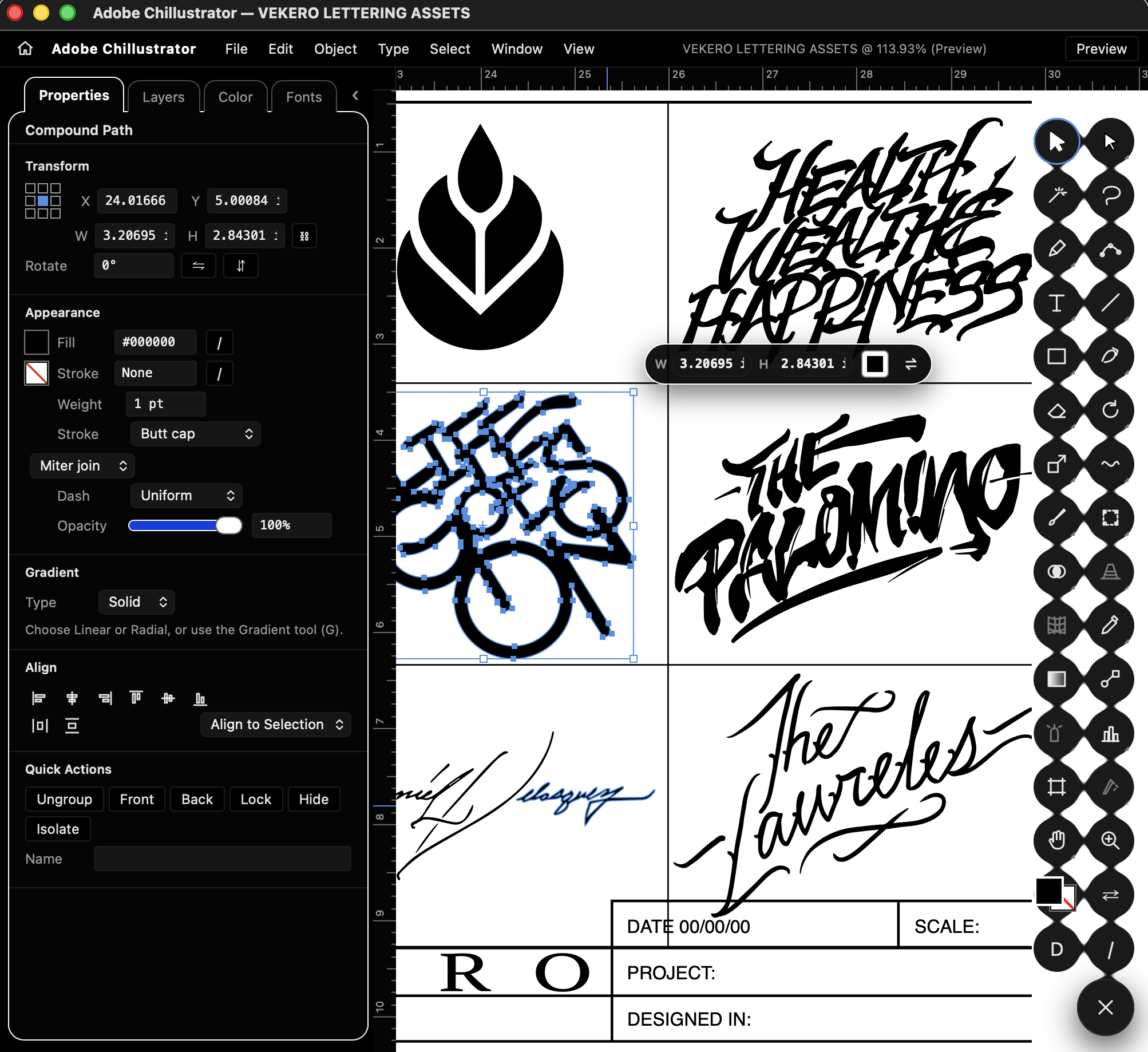
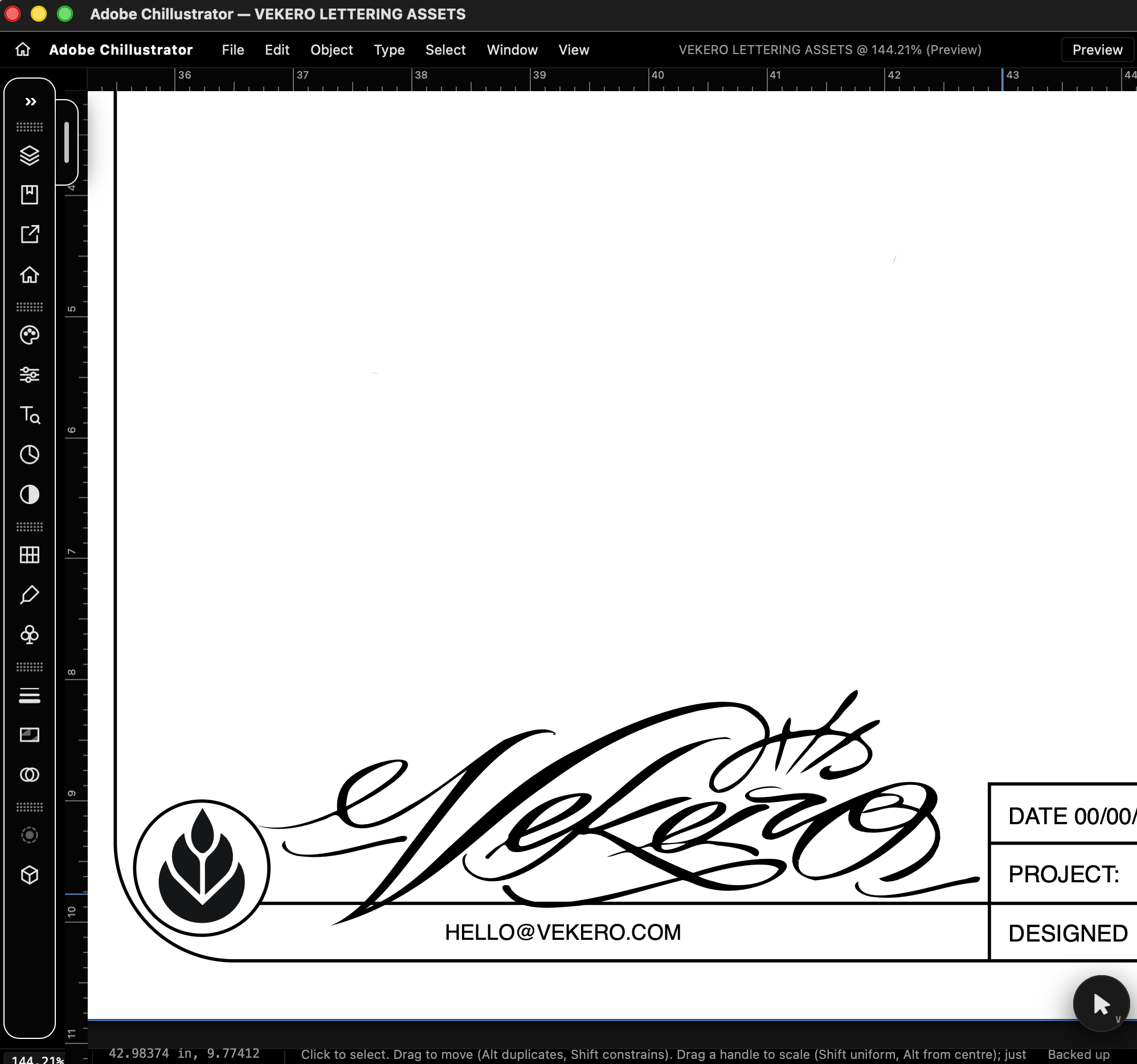
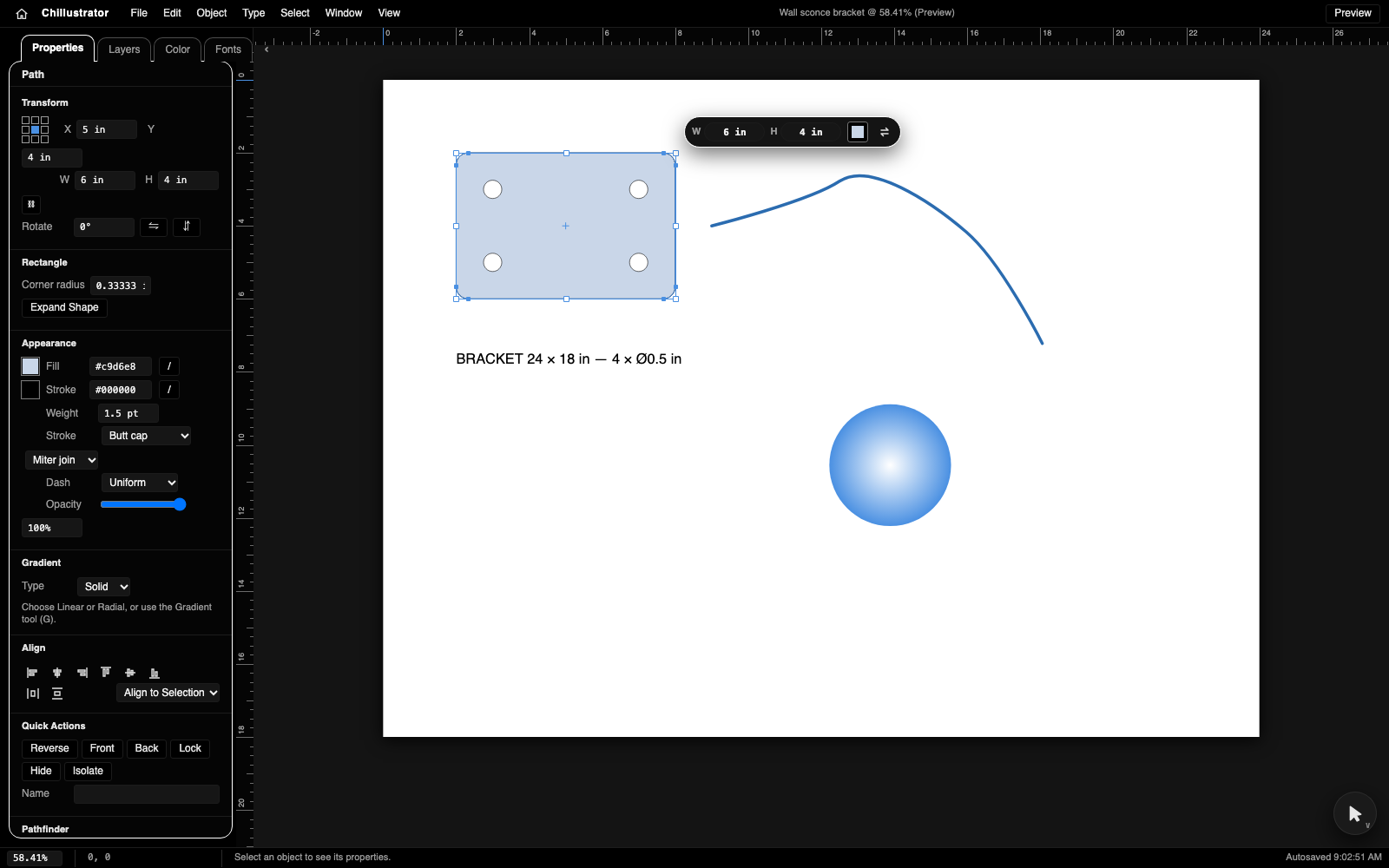
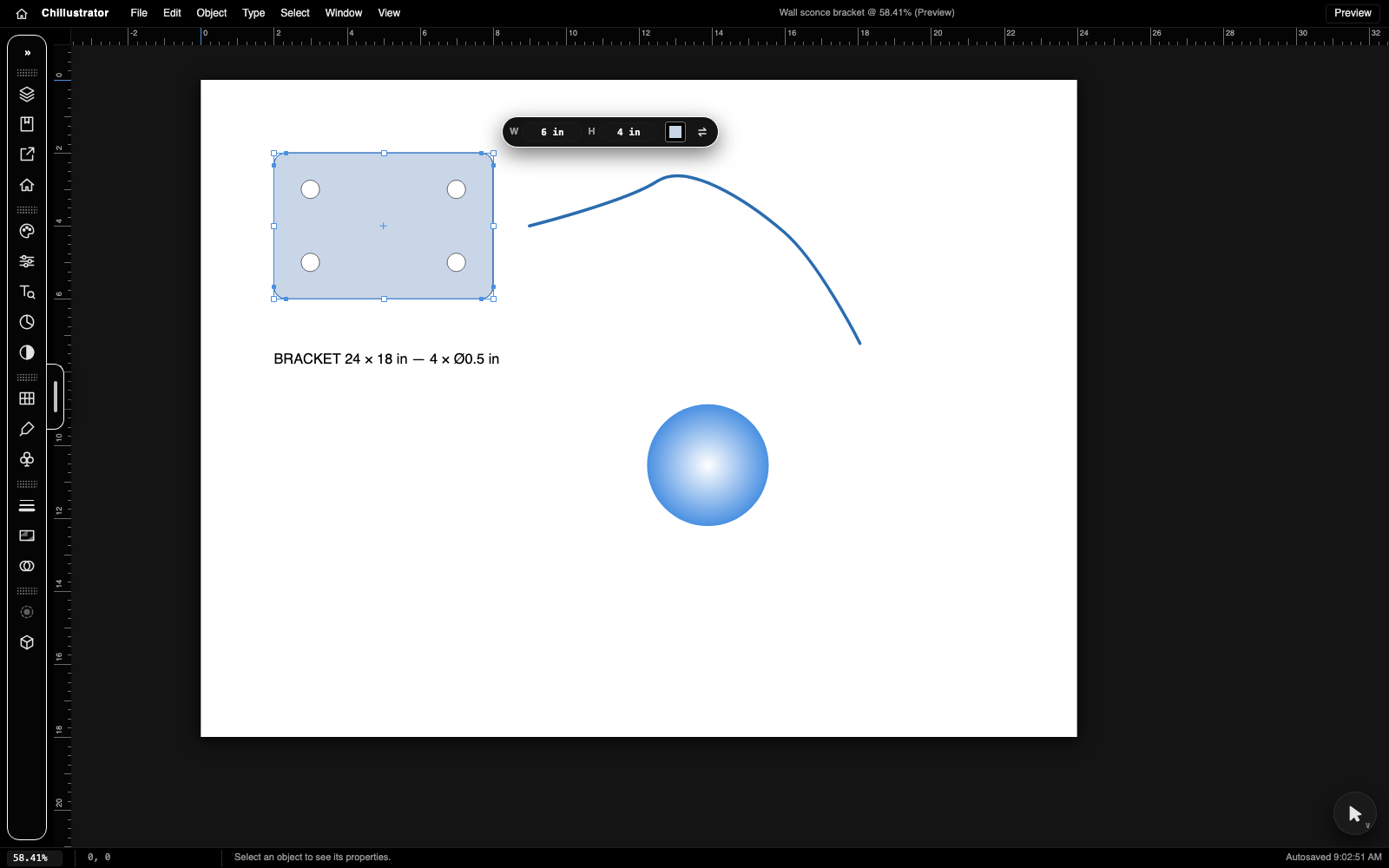
- Properties / Layers / Color / Fonts panel in a tuck-away module, a dock of panel icons, a tool stack that blooms from a corner circle, a W × H HUD on the selection.
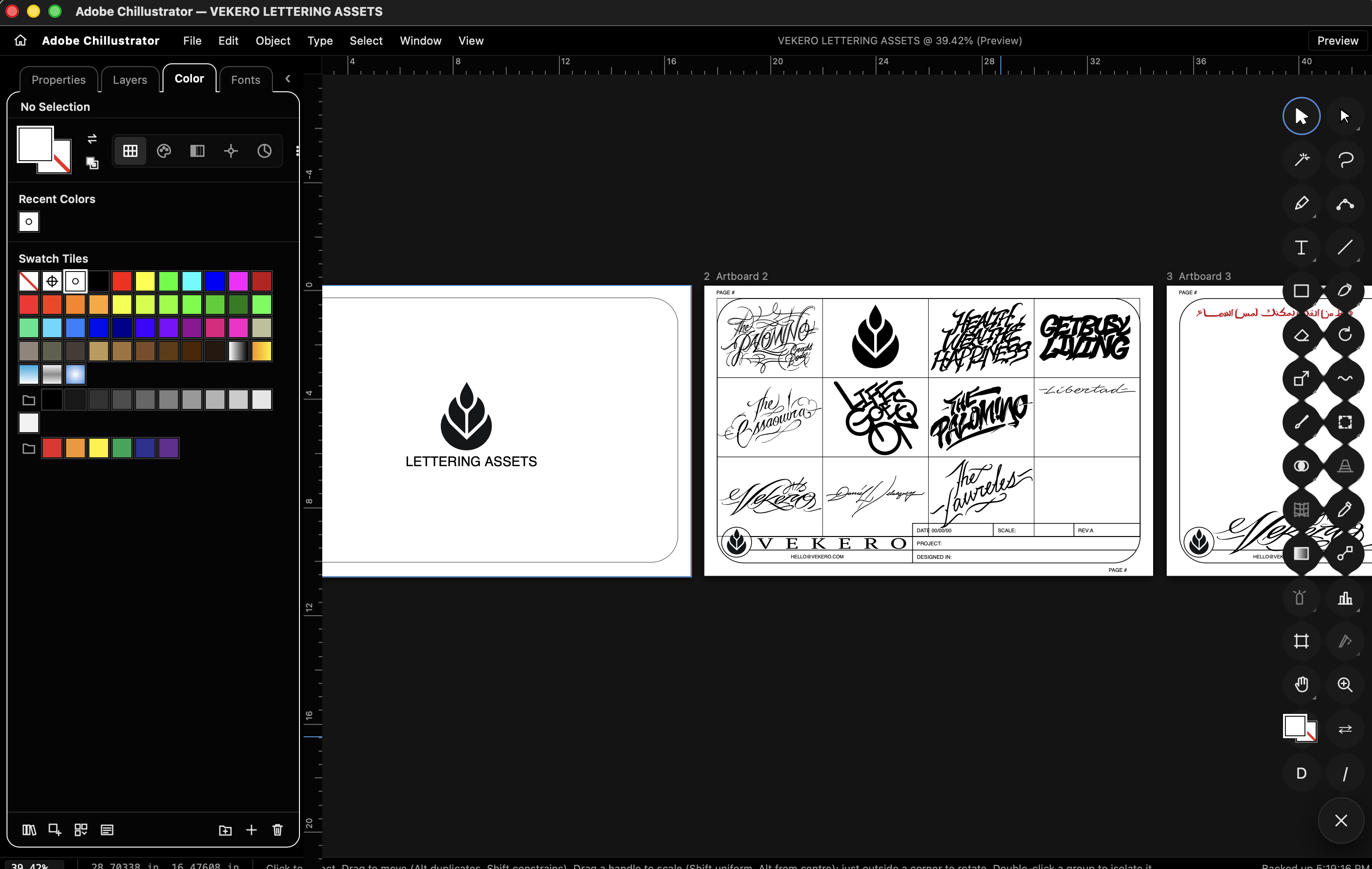
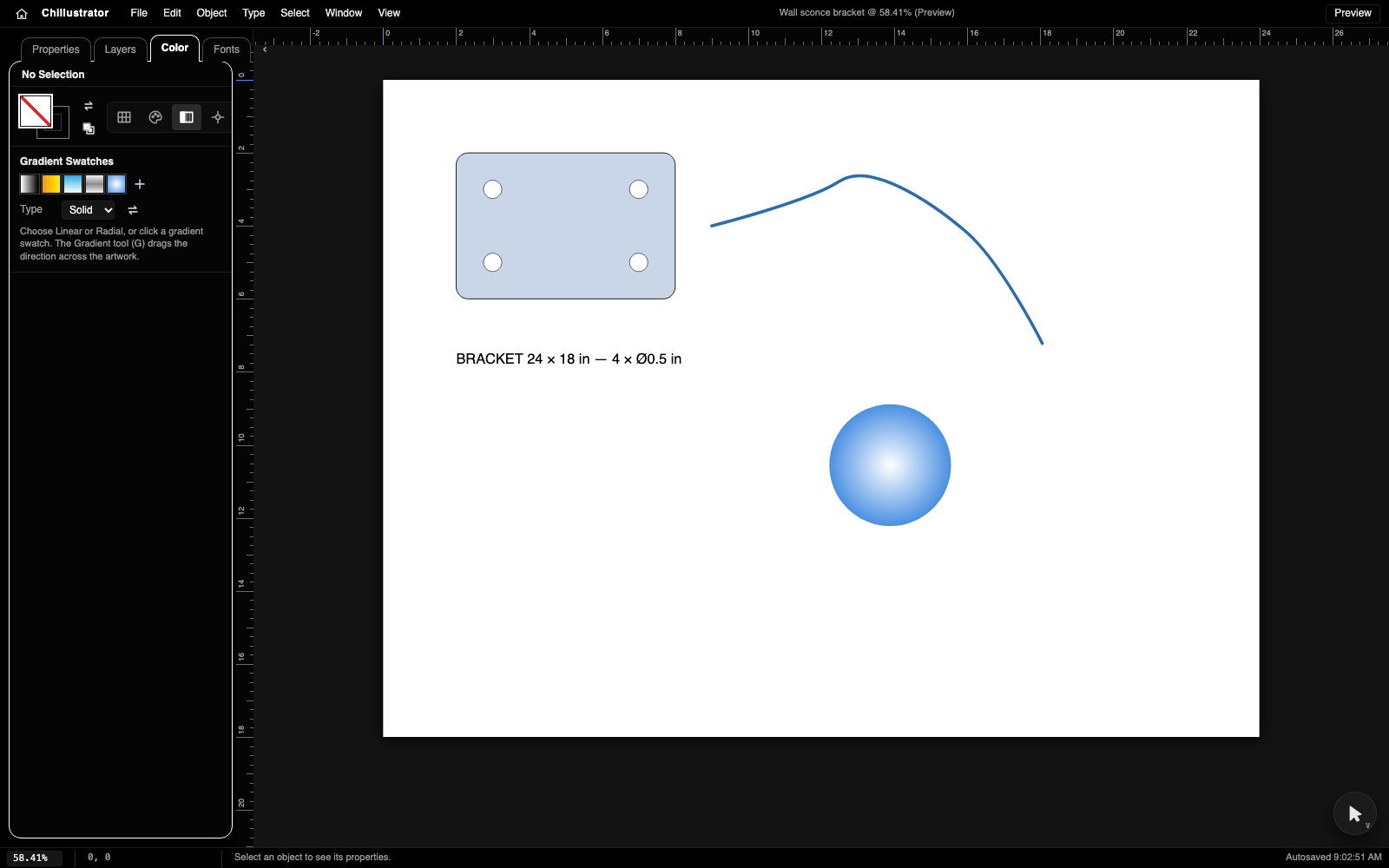
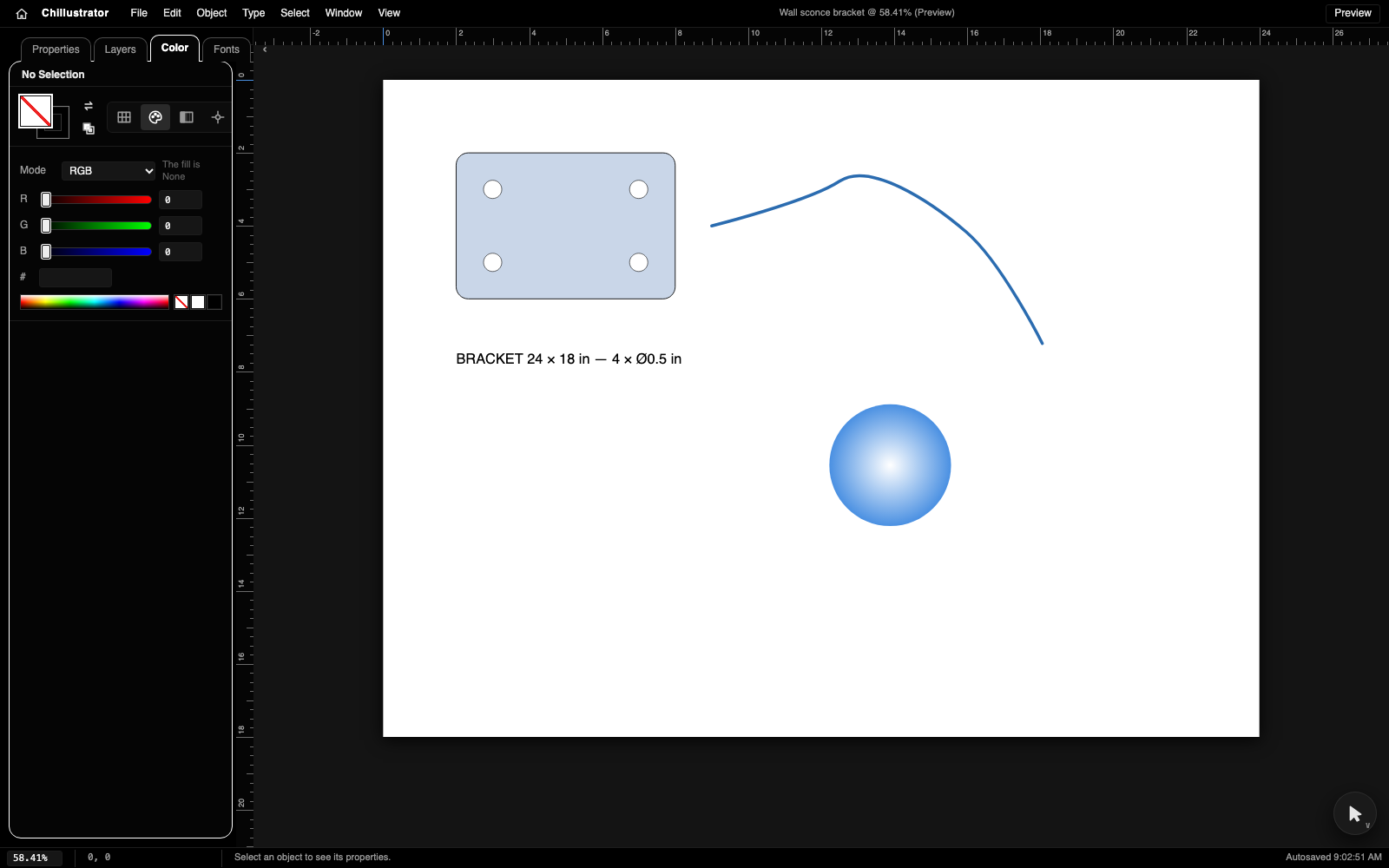
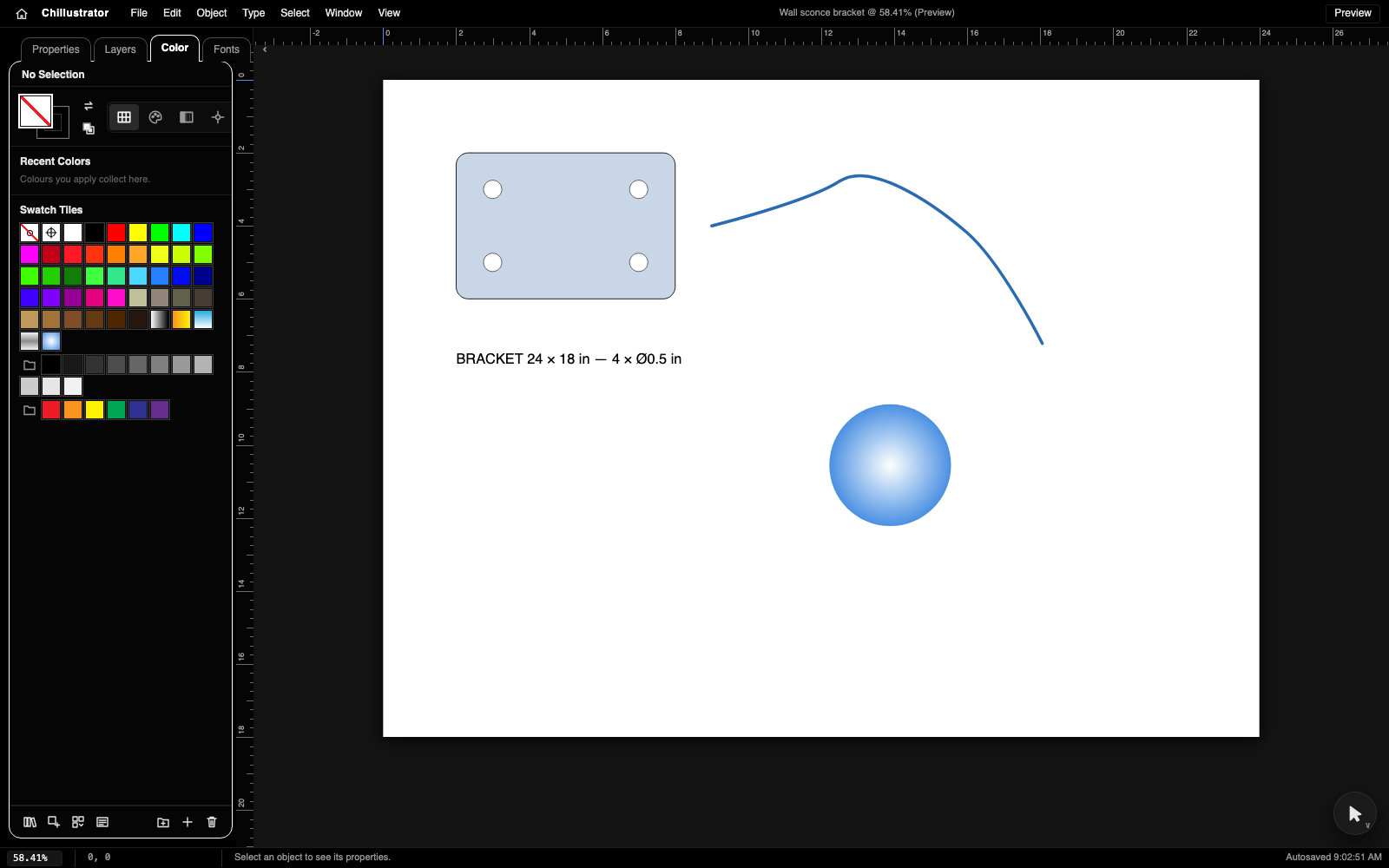
- The colour module: swatches with colour groups and ten libraries, Grayscale/RGB/HSB/CMYK mixer, gradient editor, colour picker, colour guide.
- Exact Pathfinder (Unite, Minus Front, Intersect, Exclude split curves only at true crossings — no added points), compound paths the way Illustrator models them, multiple artboards.
- Import
.ai(PDF-compatible) and PDF with layers, compound paths, clipping groups, text and images; import SVG and images; Image Trace. - Export SVG, PDF/.ai (one page per artboard), EPS, DXF (AutoCAD 2000: lines, polylines with arc bulges, circles, ellipses, exact splines, text; mm or in), PNG/JPEG, TrueType fonts you draw yourself, JSON.
- A Home screen with a document library (IndexedDB), folders and thumbnails. No backend: cloud saves are optional and point at a table you create yourself (we suggest Supabase).
- 606 automated assertions (243 engine, 363 in-page tool spec) and a 20-section handoff.
Honest limits: a few Illustrator tools are stubs that explain themselves (Mesh, Perspective, Symbols, Width, Puppet Warp, Reshape, Slice), there are no pattern fills or gradient strokes, no DXF import, and .ai import reads the PDF side only (no groups or effects). See the handoff's feature inventory before buying.
What you get
A paid license to use it in your own projects. You cannot resell the kit itself.
Straight talk
What the maker's AI found when it looked at the app, after running it. Vibe Codes checks this against the package.
Chillustrator is a real, working vector editor with an unusually exact geometry core and complete, honest test coverage of its tools; the author uses it on production Illustrator files. It is ready to sell as a beta for designers and developers who want a readable, dependency-free Illustrator-style editor with CAD-grade exports, as long as the stub tools and missing pattern/DXF-import features in the handoff are understood.
Reviews
No reviews yet. Used it? Be the first.
Peer reviewed: only people who bought, downloaded or opened it through Vibe Codes can score it, part by part — the stars are the average of the parts. Anyone signed in can comment below.
Tech specs
· for developers, and for when you are ready
- Built with
- Swift, Node.js, No backend
- License
- LicenseRef-Commercial
- Includes
- The screens · The engine · Instructions · Pictures & logo
- Listed
- Last reachable
Development score: 2.5 of 5 (5/10 on the rubric) — Used for real
Built in 22 commits over two days and used for real by its author (importing and editing production .ai files, exporting DXF for a CNC), with recurring bugs fixed, two test suites that pass, and a user guide plus audit — but no other users yet, no CI, and several Illustrator tools are still stubs.
- 22 commits on 2026-10-10 and 2026-10-11, each with tests green
- 243 engine assertions (node) and 363 in-page tool assertions pass from this package's copy
- README.md (user guide) and AUDIT.md (14-section accuracy audit) exist
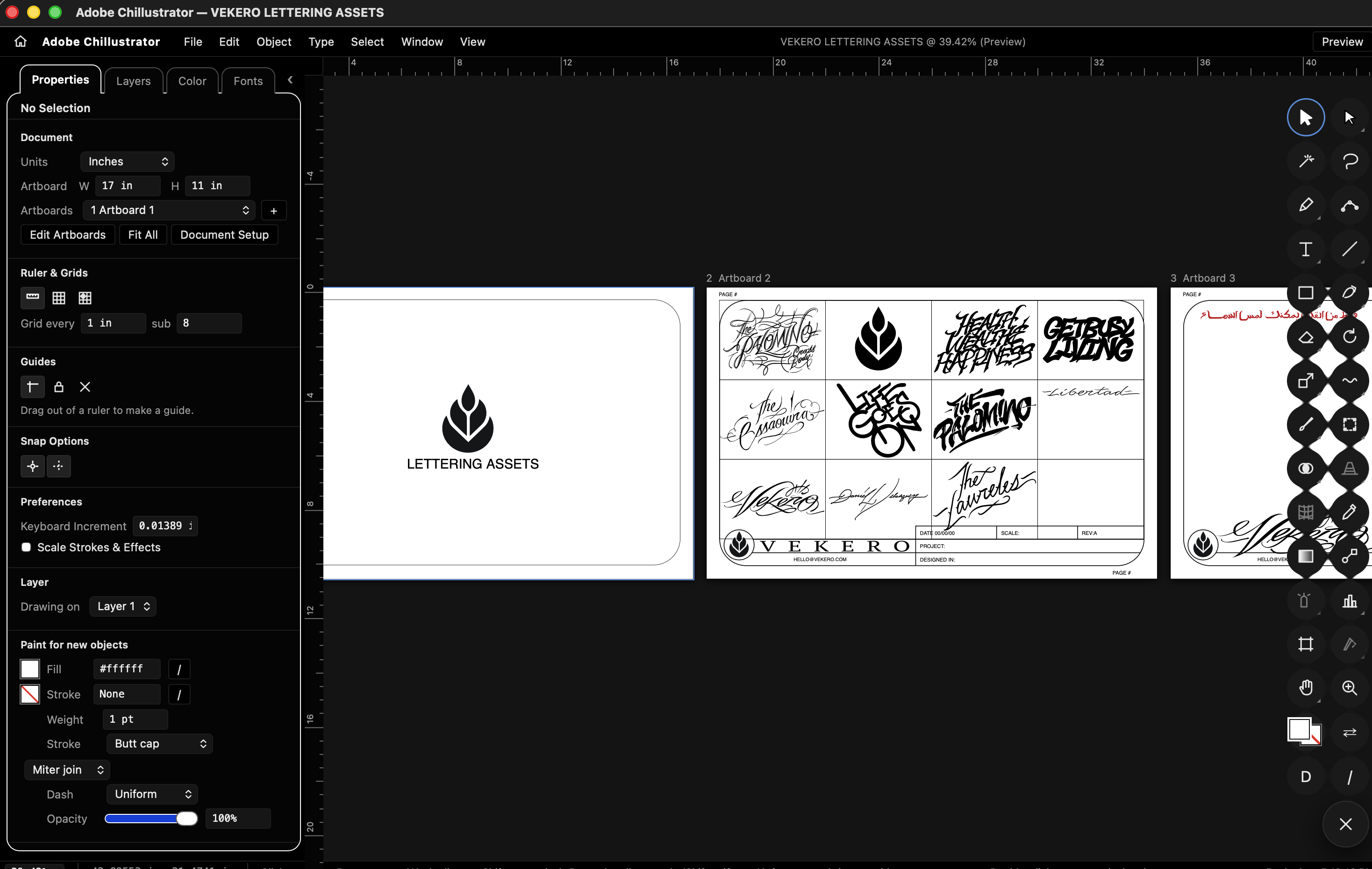
- Author uses it on real .ai files (a six-artboard lettering sheet imports faithfully)
- 12 toolbar slots are explanatory stubs; no DXF import; no CI; no users other than the author
Setup guide
Unzip, run node backend/server.js, open http://localhost:8092. Optional cloud saves: create your own table (we suggest Supabase) with the columns listed in ui/cloud.config.js and fill in your URL and key there. macOS app: cd backend/desktop && ./build.sh --install (Xcode command line tools).
Full handoff document
· long on purpose; read the section you need
Chillustrator — Handoff
Everything a buyer needs to run, understand, change and extend Chillustrator. Written by the AI assistant that built it with the author, from the code, the tests and the commit history as of 2026-10-11. Where something was not verified it says so.
1. Overview
Chillustrator is an Adobe Illustrator–style vector drawing app that runs as a single web page (and as a small macOS desktop app around that page). It is built for people who draw parts to be cut, printed or engraved and need the drawing to be dimensionally exact: every coordinate is a double in points (1/72 in) like Illustrator's own unit, shapes keep their exact parameters (a 4 × 3 in rectangle exports as a 4 × 3 in rectangle, a circle exports as a circle), and the exporters (SVG, PDF/.ai, EPS, DXF, PNG/JPEG, TTF, JSON) write real geometry, never tessellated approximations.
Who it is for. Makers, millworkers, sign and lighting shops, designers who live in Illustrator but want a free, local, no-account tool that exports CAD-grade DXF and Illustrator-compatible PDF, and developers who want a readable, dependency-free vector editor to build on.
How it came to be. The author (a millwork and lighting designer) directed it; Claude (Anthropic's model, via Claude Code) wrote the code. It was built in two intensive days, 2026-10-10 and 2026-10-11, in 22 commits, each commit a working increment with its tests green. The author supplied the product direction, the Illustrator reference screenshots, real .ai files to test import against, the visual design decisions (black chrome, tucked panel, tool stack) and acceptance testing in the browser and the desktop app. The assistant wrote all code, the test suites and these documents. Nothing was copied from Illustrator or any other product; the only third-party code is Angus Johnson's Clipper 6.4.2 (Boost Software License), vendored and loaded on demand for polygon booleans and offsets.
2. Feature inventory
Status key: WORKS = covered by the automated specs or checked by hand in the browser; PARTIAL = works with stated limits; BROKEN = known not to work; UNTESTED = no automated or manual check. Evidence: 363 browser assertions (?test) and 243 engine assertions (node test-all.js), all passing on 2026-10-11.
Screens
- Home (house icon / first launch) — WORKS. Library of documents with thumbnails, folders (new, rename, delete, move, drag onto a folder), New…, Open from disk, drop
.ai/PDF/SVG/JSON/image files to import, cloud-save status bar (only when a cloud table is configured). - Drawing board — WORKS. Rulers (drag out guides, drag the corner to set origin), artboards (multiple), pasteboard, zoom 1–6400 %, rotate view, outline/preview mode, grid, smart guides, snap to point/grid.
- Properties panel (left, tucks away) — WORKS. Document (units, artboard size, artboards list, ruler/grid/guides/snap), Transform (reference point, X Y W H, link, rotate, flips), Live Shape (rect radius, polygon sides, star points…), Character, Appearance (fill, stroke, weight, cap, join, dash, opacity; "Paint for new objects" when nothing is selected), Gradient, Align/Distribute, Quick Actions, Pathfinder, Image Trace (when an image is selected), Anchor Point (when one anchor is selected).
- Layers tab — WORKS. Layers with visibility, lock, colour, rename, reorder; artboards list; object tree with
<Path>,<Group>,<Compound Path>,<Clip Group>,<Type>; click/shift-click selection, double-click rename. - Color tab / colour popover — WORKS. Swatches (document swatches, colour groups, recent colours, None, Registration, list view, Swatch Options with Global, New Swatch, New Color Group, Add selected colours, Delete, drag to reorder, kinds filter, sorting, ten built-in libraries, open/save library file), Color Mixer (Grayscale/RGB/HSB/CMYK/Web Safe sliders with live ramps, hex, spectrum bar), Gradient (swatches, linear/radial, reverse, angle, stop bar with add/move/remove, stop colour, location), Color Picker (square + hue strip + HSB/RGB/CMYK/hex, Only Web Colors), Color Guide (eight harmony rules, tints/shades, save as group).
- Fonts tab — WORKS. System font list, load a TTF/OTF file, custom fonts drawn glyph by glyph in the font maker (em square with guides), export the custom font as TTF, Create Outlines.
- Dock (when the panel is tucked) — WORKS. Illustrator's collapsed-panel icon strip on the left: each icon opens the matching tab/section; groups drag to rearrange; a pull tab brings the panel back.
- Tool stack (bottom-right circle) — WORKS. Blooms into two columns of 28 Illustrator slots with flyouts; drag to rearrange; order remembered.
- Size HUD — WORKS. W × H fields at the selection's top-right corner, fill/stroke swatch with a drop-down (fill, stroke, weight), swap arrow.
- Menus File / Edit / Object / Type / Select / Window / View with Illustrator's shortcuts — WORKS (every item is wired; see §12 for stubs).
- Desktop app (macOS) — WORKS on the author's Mac (Apple Silicon, macOS 15). Swift + WKWebView shell with native Save/Open panels. UNTESTED on Intel Macs and on macOS < 13.
Tools (Illustrator key in brackets)
- Selection (V), Direct Selection (A), Group Selection, Magic Wand (Y), Lasso (Q) — WORKS: click/shift/alt/marquee, scale and rotate handles, isolation mode, anchor and segment editing, handle dragging with Alt to break pairs.
- Pen (P), Add/Delete Anchor (+/−), Anchor Point (Shift+C), Curvature (Shift+~) — WORKS, including close, continue, reverse-and-continue, Shift constrain, Alt handle breaking.
- Type (T), Area Type, Type on a Path, vertical/touch type — WORKS for point, area and path type with live editing; vertical and touch type are PARTIAL (they explain themselves and fall back to point type).
- Line (\), Arc, Spiral, Rectangular Grid, Polar Grid, Dimension — WORKS; shapes created by click get an exact-size dialog.
- Rectangle (M), Rounded Rectangle, Ellipse (L), Polygon, Star, Flare — WORKS as Live Shapes (exact parameters kept until an anchor edit); Flare is a stub (PARTIAL).
- Paintbrush (B), Blob Brush (Shift+B), Shaper (Shift+N), Pencil (N), Smooth, Path Eraser, Join — WORKS (brush strokes are smooth round-capped paths; the blob brush paints a filled band and merges).
- Eraser (Shift+E), Trim, Scissors (C), Knife — WORKS (Trim cuts a stretch back to the nearest crossing or corner exactly, no flattening).
- Rotate (R), Reflect (O), Scale (S), Shear, Reshape, Width (Shift+W), Warp/Twirl/Pucker/Bloat/Scallop/Crystallize/Wrinkle, Free Transform (E), Puppet Warp — Rotate/Reflect/Scale/Shear/Free Transform/Warp family WORK (dialogs on Alt-click, copies on Alt-drag, Transform Again); Reshape, Width and Puppet Warp are stubs (PARTIAL: they toast an explanation).
- Shape Builder (Shift+M), Live Paint Bucket (K), Live Paint Selection — WORKS on exact polygons (0.005 pt flattening) via Clipper.
- Perspective Grid, Mesh (U) — stubs (PARTIAL).
- Gradient (G), Blend (W), Eyedropper (I), Measure — WORKS.
- Symbol Sprayer family — stubs (PARTIAL).
- Column/Bar/Line/Area/Scatter/Pie graphs (J) — WORKS with a data dialog; Stacked and Radar graphs are stubs (PARTIAL).
- Artboard (Shift+O), Slice, Hand (H), Rotate View (Shift+H), Zoom (Z), Print Tiling — Artboard/Hand/Rotate View/Zoom WORK; Slice and Print Tiling are stubs (PARTIAL).
Import and export
- Import
.ai(PDF-compatible) and PDF — WORKS: object streams, Flate (own inflater), ASCIIHex/85, predictors, CMYK/RGB/Gray colour, ExtGState opacity, Form XObjects, Illustrator layer and optional-content marks, text runs, DCT images, compound paths with the file's fill rule, clipping groups, every page as an artboard. PARTIAL: Illustrator's private (non-PDF) data is ignored, so groups and effects are not recovered;.aifiles saved without "Create PDF Compatible File" cannot be read. - Import SVG — WORKS (paths with arcs, transforms, styles, gradients, compound paths, fill-rule).
- Import images (PNG/JPEG) and Image Trace (black-and-white with threshold, colour with palette, sub-pixel marching squares, corner-aware smoothing) — WORKS.
- Export SVG, PDF (one page per artboard, verified xref), EPS, DXF (AC1015: LINE, LWPOLYLINE with arc bulges, CIRCLE, ELLIPSE, exact cubic SPLINE, TEXT; mm or in), PNG/JPEG at a chosen ppi, TTF (own TrueType writer), JSON — WORKS. DWG — PARTIAL: there is no browser DWG writer, so Export DWG writes DXF and explains how to convert.
- Import DXF/DWG — BROKEN (not built).
Library and cloud
- IndexedDB library with autosave, thumbnails, folders — WORKS.
- Cloud mirror of the library — WORKS against a Supabase REST table when configured (optional; no backend ships; off until you fill
cloud.config.jswith your own project).
3. Architecture
Everything is plain ES2020 JavaScript with no build step, no framework and no runtime dependency except the vendored Clipper, loaded lazily the first time a boolean or offset is needed.
`` browser (or WKWebView in the macOS shell) ┌───────────────────────────────────────────────────────────────┐ │ index.html │ │ ├ cloud.config.js optional cloud url/key (window.CHILL_CLOUD), empty │ ├ engine.js ─ pure functions: document model, béziers, paths, booleans, │ │ units, SVG/PDF/EPS/DXF/TTF writers, PDF/SVG/TTF readers, │ │ image trace, colour spaces, swatches (also runs in node) │ ├ app.js ─ state S, view, canvas renderer, hit testing, history, │ │ snapping, fonts registry, IndexedDB library, HUD hook │ ├ tools.js ─ every tool's pointer logic (T.<name>.down/move/up) │ ├ panels.js ─ menus, shortcuts, tool stack, Properties/Layers/Fonts tabs, │ │ dock, dialogs, text editing, Home, cloud mirror, import, export │ ├ color.js ─ the colour module (swatches/mixer/gradient/picker/guide) │ ├ hud.js ─ the W×H / paint HUD on the selection │ └ vendor/clipper.js (loaded on demand) └───────────────────────────────────────────────────────────────┘ │ IndexedDB "chillustrator" / docs │ localStorage (prefs, layout) │ optional HTTPS → your own REST table │ optional window.webkit bridge → Swift shell (save/open) ``
- State lives in one object
A.S(app.js): the document (S.doc), selection (S.sel,S.anchors), view (S.zoom,S.pan,S.rot), current paint, tool, history (full-document snapshots, 100 deep), UI flags. Panels read it and callA.*functions; nothing else holds state. - Rendering is immediate-mode canvas:
render()redraws everything onrequestAnimationFramewhen dirty, with per-item bounds caching for culling. Rulers are separate canvases. - Engine is DOM-free so the same file powers the node test suite and the page.
- Server (
backend/server.js) is a 10-line static file server; the page is static. - Desktop shell (
backend/desktop/main.swift) is one WKWebView window loading the bundled page fromfile://, with message handlerssave(native Save panel for exports) andtitle.
4. Data model
There is no database required. A document is one JSON object (saved in IndexedDB, optionally mirrored to a cloud table of your own):
`` doc { version: 2, id, name, units: 'in'|'mm'|'cm'|'pt'|'px', folder: string|null, artboards: [{ id, name, x, y, w, h }], active: index, // doc.artboard = live alias of the active one layers: [{ id, name, hidden, locked, color, items: [item…] }], swatches: [swatch | { kind:'group', name, items:[swatch…] }], fonts: [{ family, unitsPerEm, glyphs: { ch: { adv, contours } } }], // custom fonts guides: [{ axis, pos }], grid: { show, step, sub }, prefs: { … } } item = path { id, type:'path', segs:[{ p:[x,y], hi:[dx,dy], ho:[dx,dy] }], closed, holes?:[segs…], live?:{kind, …exact params}, style, name } | group { id, type:'group', items:[…], clip?:true, compound?:true, name } | text { id, type:'text', p, text, style:{ fontFamily, fontSize, align, … }, box?:[w,h], onPath?, rotation } | image { id, type:'image', src (data URL), x, y, w, h, rotation, natW, natH, opacity } style = { fill: '#rrggbb' | gradient | null, stroke, strokeWidth, opacity, cap, join, dash, evenOdd } gradient = { type:'linear'|'radial', stops:[{o, c}], x1,y1,x2,y2 | cx,cy,r } (unit-box coordinates) swatch = { id, name, kind:'color', c, global? } | { id, name, kind:'gradient', g } ``
Handles are relative to their anchor, so moving an anchor carries its handles. Compound paths are groups flagged compound whose child paths fill as one shape; holes on a path are only produced by booleans and tracing.
Library record (IndexedDB store docs, keyPath id): { id, name, modified (ms), json (the document as text), thumb (JPEG data URL), folder }. Cloud table (if you add one): the same fields plus device; the shape is described in ui/cloud.config.js. No backend, schema or policies ship with this package.
Personal data. The app stores nothing about the user. Documents may contain whatever the user draws or types. If a cloud table is configured, document JSON, names, thumbnails and navigator.platform go to the buyer's own backend and nowhere else.
5. Auth and permissions
None. There are no accounts, roles or sign-in. If the buyer adds a cloud table, the key in cloud.config.js is sent as a bearer token and the buyer's own policies decide what it may do; the author's backend is not part of this package in any form.
6. Payments and money
None. Nothing in the app charges, bills or talks to a payment provider.
7. External services
| Service | Used for | Cost | Credentials | Without it | |---|---|---|---|---| | A cloud table of your own (optional; we suggest Supabase) | Mirror the Home library so it survives a cleared browser and syncs between machines | Supabase free tier is enough for personal use | Create a table chill_documents with the columns listed in ui/cloud.config.js, secure it, and put your project URL + publishable key in that file | Everything works; the library stays in the browser's IndexedDB only | | Nothing else | — | — | — | — |
No analytics, no telemetry, no fonts or scripts from CDNs, and no request leaves the page unless you configure a cloud table.
8. Environment variables
The page is static, so it cannot read a .env. No backend ships. The two optional values for cloud saves live in ui/cloud.config.js; .env.example lists them for completeness.
| Variable | What | Where to get it | Shape | |---|---|---|---| | SUPABASE_URL | Your own Supabase project URL (if you choose Supabase for cloud saves) | Your Supabase dashboard › Project Settings › API | https://abcdefghijkl.supabase.co | | SUPABASE_PUBLISHABLE_KEY | The publishable (anon) key | Same page | sb_publishable_… or the legacy eyJ… anon JWT | | PORT (server only) | Port for backend/server.js | — | 8092 |
9. Setup from zero
Requirements: Node.js 18 or newer (only to serve the files and run the tests). A Chromium-based browser or Safari 16+.
``bash unzip chillustrator-vibecodes.zip && cd chillustrator node backend/server.js # serves ui/ at http://localhost:8092 `` Open http://localhost:8092. Home appears; press New… and draw. ⌘S saves to the library, File › Export As… writes files.
Tests: ```bash node ui/test-all.js # 243 engine assertions in node
then open http://localhost:8092/?test and read window.VECR_TEST — 366 browser assertions
```
Optional cloud saves: create a table in your own Supabase project with the columns listed in ui/cloud.config.js, add your policies, then fill url and key in that file and reload.
macOS desktop app (needs Xcode command line tools): ``bash cd backend/desktop && ./build.sh --install # builds Chill.app into /Applications ``
10. Deploying
The author never deployed Chillustrator publicly; it ran from node server.js on the author's Mac and as the desktop app. Because the page is static, any static host works: copy ui/ to Netlify, Vercel, GitHub Pages, S3 or an nginx folder. The server in backend/ reads $PORT, so Railway/Render/Fly run it as-is with node backend/server.js. Things a buyer must change: fill ui/cloud.config.js if cloud saves are wanted; set the brand name (§17).
11. Testing
ui/test-engine.js(run throughui/test-all.js): 243 assertions on geometry (béziers, intersections, booleans, trim), units, Live Shapes, the SVG/PDF/EPS/DXF writers, the PDF reader, compound-path import, TrueType build/parse, image trace, colour spaces, swatches, harmonies. Runs in ~1 s.ui/test-tools.js(loaded by?test): 366 assertions that drive every tool and panel with synthetic pointer and keyboard events in the real page: selection, direct selection, pen family, type, shapes, brushes, erasers, transforms, Pathfinder, exports, fonts, image trace, trim, artboards, Home library and folders, colours, compound paths, dock and HUD. Runs in ~35 s.- Not covered: the macOS shell (manual only), real-click focus behaviour (synthetic events cannot catch focus bugs; the author tests typing by hand after any change to text or focus code), Safari and Firefox, touch input, the cloud mirror (the specs run with it disabled).
12. Known bugs and limitations
- Stub tools (they explain themselves and do nothing else): Mesh, Perspective Grid, Symbols, Width, Puppet Warp, Reshape, Slice, Print Tiling, Flare, vertical/touch type, stacked and radar graphs (
tools.js,stub()). - No pattern swatches and no gradients on strokes; the renderer and exporters know flat strokes only (
app.jsdrawItem, engine writers). - No DXF/DWG import. DWG export is DXF plus an explanation (no browser DWG writer with a permissive licence).
.aiimport reads the PDF side only; Illustrator groups, symbols, effects, brushes and gradient meshes are not recovered. Files saved without PDF compatibility fail with a clear message.- CMYK ↔ RGB uses the plain formula, not an ICC profile, so CMYK-named swatches are a little more saturated than in Illustrator (
engine.jscmykToRgb). - PDF/EPS export flattens gradients to their average colour; PDF text uses Helvetica only (custom fonts: use Create Outlines first).
- Cloud saves need a table you create yourself; nothing ships for it beyond the column list and the four mirror functions.
- Keyboard shortcuts follow Illustrator's Mac bindings; Ctrl stands in for ⌘ on other platforms but the menu labels still say ⌘.
- Very large imports (thousands of paths) redraw the whole canvas per frame; see §14.
- Known cosmetic: the dock's scroll is hidden, so on very short windows the last dock icons are reachable only by scrolling.
13. Security review
Checked by reading every file in the package:
- Secrets: the author's cloud project URL and publishable key were hard-coded in
panels.js; removed and replaced bycloud.config.jswith empty values, and the author's table schema and policies were left out of the package. No other keys, tokens or credentials exist..env.exampleadded. - Code execution: no
eval, nonew Function, no dynamic script loading from the network.evalExpr(engine) is a hand-written arithmetic parser for the numeric fields (+ − × ÷and parentheses only). Clipper is loaded from the package's ownvendor/folder. - Network: outbound requests only to the cloud URL in
cloud.config.js, and only when it is set. No analytics or trackers. - Input: imported files are parsed in JavaScript with bounds-checked readers; a malformed PDF throws a caught error and shows a toast. SVG import uses
DOMParserand reads attributes only (no script execution). Image import uses data URLs drawn to canvas. - Server:
server.jsnormalises paths and refuses anything outside its root (403); it serves static files only, no uploads, no dynamic routes. - Injection / XSS: panel strings are set with
textContentor built from internal data; document names are escaped where they enterinnerHTML(esc). File names from drops are used as document names viatextContent. - Desktop shell: WKWebView loads only bundled files;
developerExtrasEnabledis on (right-click › Inspect Element) which a buyer may turn off inmain.swift. - Remaining: securing any cloud table is the buyer's job (§5); no rate limiting anywhere (not needed for a static page); the library is unencrypted in the browser's IndexedDB like any local app data.
14. Performance and scale
- Rendering is a full redraw per dirty frame; documents up to a few thousand paths stay smooth on a laptop, tens of thousands get sluggish (the author's largest real file, a six-artboard lettering sheet with ~2,000 anchors per word, is fine).
- Booleans: exact booleans run in milliseconds; Clipper fallbacks flatten at 0.005 pt and are also fast. Image Trace is capped at 1200 px on the long side by default (
S.trace.maxPx). - History keeps up to 100 full-document snapshots in memory; huge documents with embedded images can use a few hundred MB — lower the cap in
app.jscommit()if needed. - Costs at 10× users: zero for the static page; a cloud table grows with document JSON (a typical drawing is 5–100 KB, images embedded as data URLs are the big ones).
15. Code map
`` chillustrator/ ├ vibecodes.json, .env.example, README.md, LICENSE-THIRD-PARTY.md ├ ui/ │ ├ index.html the page: menubar, panel card, workspace, dock, tool stack, Home overlay, dialogs │ ├ styles.css black theme tokens, panel/dock/tool stack/colour module/Home styles │ ├ engine.js model + geometry + every reader/writer (DOM-free; also used by node tests) │ ├ app.js state, view, renderer, hit testing, history, snapping, fonts, IndexedDB library │ ├ tools.js all tools' pointer logic and selection/transform operations │ ├ panels.js menus, shortcuts, tool stack, dock, Properties/Layers/Fonts, dialogs, Home, folders, │ │ cloud mirror, .ai/SVG/image import, exports │ ├ color.js swatches / mixer / gradient / picker / colour guide / popover / recent colours │ ├ hud.js the W×H HUD at the selection │ ├ cloud.config.js optional cloud settings (empty) and the table shape the mirror expects │ ├ vendor/clipper.js Clipper 6.4.2 (Boost licence) │ ├ test-engine.js, test-lib.js, test-all.js node tests; test-tools.js browser spec (?test) │ └ package.json ├ backend/ │ ├ server.js static server for ui/ ($PORT or 8092) │ └ desktop/ main.swift (WKWebView shell), mkicon.swift, Info.plist, build.sh ├ docs/ README.md (user guide), HANDOFF.md (this), AUDIT.md (accuracy audit and decisions log), ADAPTING.md └ assets/ screenshots (1600 px), app icon PNGs, tokens.json (colours and type) ``
16. Decisions and trade-offs
- No framework, no build. Files load in order and share the
Anamespace; this keeps the whole app readable, debuggable in any browser and trivially embeddable. The cost is long files (panels.js is the largest) and manual module boundaries. - Points as the internal unit, doubles everywhere, Live Shapes. Exactness was the brief: a 1 in circle must export as r = 36 pt, not as a polygon. Live Shapes keep parameters until an anchor is edited; exporters use them.
- Exact Pathfinder. Unite/Minus/Intersect/Exclude split curves only at true Bézier crossings and stitch the kept stretches (no added anchors). Clipper is the fallback when shapes share an edge. Shape Builder, Divide, Offset and Outline Stroke still run on Clipper polygons.
- Compound paths as groups of plain paths (not "path with holes") so every ring stays editable with the normal tools, matching Illustrator's model.
holesremain for boolean/trace output. - Own PDF reader and writers instead of pdf.js/jsPDF: no dependency, exact control over numbers, and the reader only needs the subset Illustrator writes.
- IndexedDB library + optional cloud mirror rather than files: the app feels like an app, and nothing requires an account or a backend.
- Canvas rendering over SVG DOM for predictable performance with thousands of paths.
- What the assistant would do differently with more time: split panels.js by tab, add a DXF reader, add pattern fills and gradient strokes, and add a Playwright run of the browser spec to CI.
17. How to make it yours
- Name and title —
APP_NAMEinui/panels.js,<title>and.brandinui/index.html,window.titleinbackend/desktop/main.swift,CFBundleNameinInfo.plist. - Icon —
backend/desktop/mkicon.swiftdraws the CHILL icon; change the text/colours there or drop in your own.icnsinbuild.sh. - Colours and type — the CSS variables at the top of
ui/styles.css(--bg,--panel,--accent,--ui,--mono); the same values are inassets/tokens.json. - Home —
renderHome()inui/panels.jsdraws the library cards and folders; add your own tiles or links there. - Default document —
makeDocinui/engine.js(size 24 × 18 in, units, grid, prefs) anddefaultSwatches()for the swatch set. - Default toolbar order and which tools show —
DEFAULT_TOOLBARinui/panels.js; the dock groups inDOCK. - Keyboard shortcuts —
TOOL_KEYS,SHIFT_TOOL_KEYS,SHORTCUTSinui/panels.js. - Export defaults —
exportAs()and the per-format dialogs inui/panels.js; DXF entity mapping indocDXF(engine). - Cloud saves —
ui/cloud.config.js(your URL, key and table); the mirror functionscloudPut/List/Get/Deleteinui/panels.jsare the four calls to swap for any other backend. - Fonts offered —
fontLibrary()inui/app.js(the system font list) and the Fonts tab inui/panels.js.
18. Roadmap
Planned by the author, not built: DXF/DWG import; pattern swatches and gradient strokes; the stub tools (Width, Reshape, Mesh, Perspective, Symbols, Puppet Warp); ICC-based CMYK; PDF export with embedded fonts; a Windows/Linux desktop shell (Tauri or Electron); CI running both specs.
19. Changelog
All on branch main of the author's private repository, 22 commits touching this app:
- 2026-10-10 — First version: Selection, Direct/Group Selection, Wand, Lasso, Pen family, Type, shapes, Pencil, Scissors, transforms, Eyedropper, Zoom/Hand; Properties/Layers/Color panels; SVG in/out; 97 engine tests.
- 2026-10-10 — Accuracy and weight audit (AUDIT.md); DXF export (AC1015, mm/in, arcs as bulges, exact splines).
- 2026-10-10 — Tool-by-tool behaviour spec (
?test, 162 assertions) and the bugs it found fixed. - 2026-10-10 — PDF/.ai and EPS writers, Export As…, metric/imperial exactness, Arc/Spiral/Grid/Dimension/Measure tools.
- 2026-10-10 — The whole Illustrator Advanced toolbar (28 slots, flyouts, drag to rearrange); renamed Chillustrator.
- 2026-10-10 — Type tool fixed for real clicks; Fonts tab with font library, font maker and TTF export; Image Trace.
- 2026-10-10 — macOS desktop app (Swift WebKit shell, native Save/Open, CHILL icon).
- 2026-10-10 — Black chrome; panel on the left with a tuck-away tab; tool stack as a corner circle that blooms.
- 2026-10-11 — Tool stack in two columns sized to the canvas; flyout icons; Direct Selection pointer.
- 2026-10-11 — Trim tool (exact cuts at crossings and corners).
- 2026-10-11 — Exact Pathfinder; header controls moved into the panel; Home library (IndexedDB).
- 2026-10-11 — .ai/PDF import (own inflater, object streams, layers, images, text); optional cloud mirror; drop to import.
- 2026-10-11 — Multiple artboards; per-artboard exports; pages → artboards on import.
- 2026-10-11 — Rounded panel module with folder tabs.
- 2026-10-11 — Colour module (swatches, mixer, gradient, picker, guide), swatch libraries, dock of panel icons, Window menu.
- 2026-10-11 — Dock in its own column with draggable groups and a pull tab; size HUD on the selection.
- 2026-10-11 — Import fidelity: compound paths and clipping groups; strict fill rule; Home folders.
- 2026-10-11 — Compound paths as Illustrator models them (editable rings); Make/Release Compound.
- 2026-10-11 — Desktop build fixed to ship every file.
Final test state at packaging: 366 browser + 243 engine assertions, all green, re-run from this package's copy.
20. Assistant's notes
- The package is a scrubbed copy of the author's
vecr/folder; the author's project was not modified. Code changes in the copy: the author's cloud URL/key replaced by an emptycloud.config.jswith no-op guards; the author's cloud schema and policies left out; the Home tiles that launched the author's other private apps (and the desktop shell's window-opening bridge for them) removed; the brand string "Adobe Chillustrator" shortened to "Chillustrator" everywhere (the author's working name uses Adobe's trademark; a public listing should not). - Kept deliberately:
developerExtrasEnabledin the desktop shell (right-click › Inspect Element), easy to switch off inmain.swift. - Nothing in STEP 1b's list is present: no crypto mining, shells, downloads at run time, obfuscated code, hidden accounts, trackers or third-party registries. Clipper is MIT-compatible (Boost Software License 1.0, included in
LICENSE-THIRD-PARTY.md). - Screenshots in
assets/were rendered from this package with a sample drawing; they contain no personal data. - Verified by running: node tests (243) and the full browser spec (363) from this exact package on 2026-10-13, both green; the sample drawing, colour modes and the tucked dock were screenshotted from the same copy.
Package contents
- The screens
ui/— The whole app: the page, styles, geometry engine, renderer, every tool and panel, the colour module, the HUD, Clipper, and both test suites. Serve it with backend/server.js or any static host.- Instructions
docs/— User guide (README), the 20-section HANDOFF, the accuracy audit and decisions log (AUDIT), a short adapting guide, .env.example.- Pictures & logo
assets/- The engine
backend/— The 10-line static server and the macOS desktop shell (Swift/WebKit, native Save/Open, icon generator, build script). No cloud backend ships; cloud saves are an optional hook the buyer points at their own table.
All tags
This page as Markdown · for assistants and agents, start at /llms.txt
Comments
No comments yet.